Namihey
Saves are stored in this browser.
Player notes
About this game
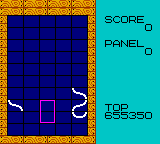
Namihey brings the line-building puzzle style of Gunpey to Game Boy Color. Arrange the line fragments so they form a connection across the board. New pieces enter from the bottom, leaving less room to work as the board rises.
Use Up and Down to choose NORMAL from the opening menu, then press X. During play, the arrow keys move a cursor that covers two vertically adjacent cells. X exchanges the pieces in those cells, including an empty cell, so you can lift or lower a useful fragment within its column. Enter pauses and resumes the board.
Look for a nearly complete route before swapping at random. A fragment can move through an empty cell, which gives you room to adjust its height. Keep an eye on the lower rows as new pieces arrive. This guide covers NORMAL mode; STAGE is a separate option in the menu.
Start here
Quick tips
Use an empty cell to move a useful fragment up or down within its column.
Pause with Enter when you need time to inspect the board.
- Up / Down
- Choose an opening menu option
- X
- Confirm a menu choice; swap the two cells inside the cursor
- Arrow keys
- Move the two-cell cursor during play
- Enter
- Pause or resume the board
Screens
Screenshots
Keep playing
Similar Games
Help improve this entry
Something not working?
Report a gameplay or information problem. Short reports are enough.
Archive notes
Rights and Source Notes
Browser play is available for this entry. Official project references are listed below.
- Distribution
- MIT
- Attribution
- Namihey by TeamKNOx; software.
- Browser player
- EmulatorJS · Browser play
- Added to archive
- 2026-07-23
- Official references