3-Demon
Saves are stored in this browser.
Player notes
About this game
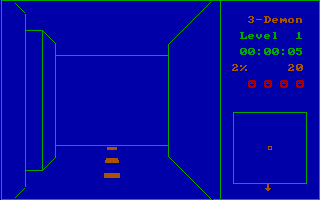
3-Demon puts the maze at eye level, with corridors ahead of you instead of a permanent overhead view. Move through the passages while watching for pursuing ghosts. At the opening display prompt, C selects colour; the title screen offers instructions and numbered starting levels.
Press H for the original controls before choosing a level from 1 to 9. Up moves forward and can be held to run. Left and Right turn at a doorway, while 5 turns you around. Down invokes the game's emergency down-level action. The large plus key on the numeric keypad displays the maze map.
Start at level 1, which the instructions identify as the easiest setting. Use the map when the first-person view makes it difficult to judge the layout. Scroll Lock pauses or resumes play, Num Lock toggles sound and Escape ends the game.
Start here
Quick tips
Begin with level 1 while learning the corridor view.
Use the keypad plus key to consult the map.
- C
- Choose colour at the opening display prompt
- H
- Read the instructions from the title screen
- 1–9
- Start at the selected difficulty level
- Arrow Up
- Move forward; hold to run
- Arrow Left / Arrow Right
- Turn left / right at a doorway
- 5
- Turn around
- Arrow Down
- Use the emergency down-level action
- Keypad +
- Display the maze map
- Scroll Lock
- Pause or resume
- Num Lock
- Toggle sound
- Escape
- End the game
Screens
Screenshots
Keep playing
Similar Games
Help improve this entry
Something not working?
Report a gameplay or information problem. Short reports are enough.
Archive notes
Rights and Source Notes
Browser play uses the archived Freeware release.
- Distribution
- Freeware
- Browser player
- js-dos · Browser play
- Added to archive
- 2026-07-28