3Detris
Saves are stored in this browser.
Player notes
About this game
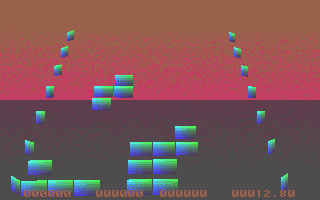
3Detris presents falling blocks as part of an experimental three-dimensional scene. The bundled Russian instructions identify freeware version 0.777 and distinguish the block controls from the viewpoint controls. You can play in the ordinary single view; the split stereo display is an optional visualization mode.
Press Enter for a new game. Number keys 1–6 control the blocks and Space drops the current piece. Num Lock pauses. The arrow keys move through the surrounding space rather than serving as the usual two-dimensional Tetris layout.
Backspace switches mouse control between the game field and the surrounding space. Page Up and Page Down change the viewing tilt, while the numeric-keypad plus and Enter alter the field’s tilt. Tab switches stereo and mono display. The bottom readouts report score, scoring rate and elapsed play time.
Start here
Quick tips
Use mono display first to learn the unusual layout.
The arrows control the viewpoint; use 1–6 for the blocks.
- Enter
- Start a new game
- 1–6
- Control the falling blocks
- Space
- Drop the current piece
- Num Lock
- Pause
- Arrow keys
- Move the viewpoint through space
- Backspace
- Switch mouse between playfield and space
- Page Up / Page Down
- Tilt the view
- Numpad + / Numpad Enter
- Tilt the playfield
- Tab
- Switch stereo / mono display
- Escape
- Exit
Screens
Screenshots
Keep playing
Similar Games

Help improve this entry
Something not working?
Report a gameplay or information problem. Short reports are enough.
Archive notes
Rights and Source Notes
Browser play uses the archived Freeware release.
- Distribution
- Freeware
- Browser player
- js-dos · Browser play
- Added to archive
- 2026-07-28