Adventures of Robbo
Saves are stored in this browser.
Player notes
About this game
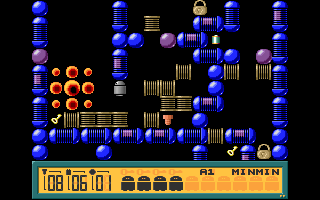
Adventures of Robbo mixes a maze puzzle with hazards that move while you explore. Guide the small robot through each planet, collect the required bolts and reach the exit. Some objects can be pushed when the space beyond them is clear, so think about the route before closing it off.
This archive contains the shareware episode. Press Space at the title to begin. Use the arrow keys to move, and collect batteries before firing: hold Space and press an arrow key to shoot in that direction. The counters below the maze show your remaining objectives and supplies.
On the first planet, a wall blocks the square directly below Robbo. Move right before heading down towards the battery on the left. If you trap yourself, Escape restarts the planet at the cost of one life. F10 returns to the title screen.
Start here
Quick tips
From the first starting square, move right before going down.
Collect batteries before trying to fire.
Avoid pushing an object into a position that blocks your route.
- Space
- Title: start the game
- Arrow keys
- Move Robbo; push movable objects when the way beyond is clear
- Space + Arrow key
- Fire in that direction using collected battery power
- Escape
- Restart the planet and lose one life
- F10
- Return to the title screen
Screens
Screenshots
Keep playing
Similar Games
Help improve this entry
Something not working?
Report a gameplay or information problem. Short reports are enough.
Archive notes
Rights and Source Notes
Browser play uses the archived Freeware release.
- Distribution
- Freeware
- Browser player
- js-dos · Browser play
- Added to archive
- 2026-07-28