Aevilia
Saves are stored in this browser.
Player notes
About this game
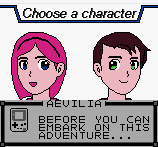
Aevilia GB is a Game Boy Color role-playing project with an opening tutorial that speaks directly to the player. The archived build introduces its controls before you explore its world. Follow those prompts in order rather than treating the first dialogue as a stalled title screen.
Use X, mapped to Game Boy A, to advance dialogue and confirm choices. The arrow keys move your character once exploration begins. A is also the interaction button, so face a person or object before pressing X. Enter represents Start and opens the menu during exploration.
The archived project build teaches its systems a step at a time. Read the tutorial, try nearby interactions and use the in-game menu to see the options available in the current scene.
Start here
Quick tips
Advance the opening dialogue with X.
Follow each tutorial prompt before trying to leave the scene.
Face an object or character before using X to interact.
- Arrow keys
- Move during exploration; choose menu entries
- X
- Game Boy A: interact, advance dialogue and confirm
- Enter
- Game Boy Start: open the menu during exploration
Screens
Screenshots
Keep playing
Similar Games
Help improve this entry
Something not working?
Report a gameplay or information problem. Short reports are enough.
Archive notes
Rights and Source Notes
Browser play is available for this entry. Official project references are listed below.
- Distribution
- Apache-2.0
- Attribution
- Aevilia by ISSOtm, Kai, Parzival, and Charmy.
- Browser player
- EmulatorJS · Browser play
- Added to archive
- 2026-07-23
- Official references