Tents
Save behavior varies by game. Check the notes below.
Player notes
About this game
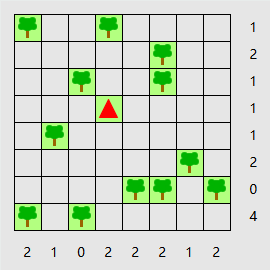
Each tree needs its own tent in a square directly above, below, left or right of it. A tent may sit next to more than one tree, as long as the final layout lets you match each tree with a different tent.
The numbers outside the grid show how many tents belong in each row and column. Tents cannot touch, even at a corner. Mark unused squares as grass to make possible tent positions easier to see.
Restoration notes
Integrated the original engine with touch controls and local resume.
Before you play
Progress is saved in this browser. The puzzle menus are in English.
Original game & community port
Simon Tatham and contributors to Simon Tatham’s Portable Puzzle Collection. WebAssembly build by FredyGames.
Start here
Quick tips
Clear rows with a clue of zero. A tree with only one possible neighbour tells you where a tent must go.
Once you place a tent, mark its eight surrounding squares as unavailable wherever they are blank.
- Arrow keys / Enter / Space
- Move cursor / place tent / mark grass
- Pointer or touch tap
- Place or remove a tent
- Right click or Alternate tap + touch
- Mark grass, or drag across blanks in a row or column
- Game toolbar
- New puzzle, restart, undo or redo
Keep playing
Similar Games
Ratings & comments
Help improve this entry
Something not working?
Report a gameplay or information problem. Short reports are enough.
Archive notes
Rights and Source Notes
Browser play is available for this entry. Official project references are listed below.
- Distribution
- MIT
- Browser player
- WebAssembly · Browser play
- Added to archive
- 2026-11-16
- Official references
- Source code
- Download open-source code packageSource code only; this is not a game ROM download.
No comments yet. Be the first to share a tip.