Towers
Save behavior varies by game. Check the notes below.
Player notes
About this game
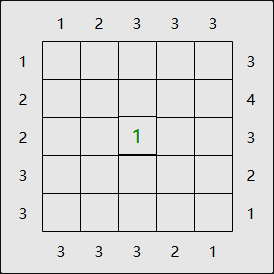
In Towers, also known as Skyscrapers, every row and column must contain each tower height exactly once. A number outside the grid tells you how many towers you can see looking in from that side. A taller building hides any shorter building behind it.
Select a square, then enter a height. On a phone, use the number buttons underneath the board. Use a right click or turn on Alternate tap before selecting a square if you want to jot down candidates instead of committing to a height.
Restoration notes
Added a touch keypad and integrated local resume with the site player.
Before you play
Progress is saved in this browser. The puzzle menus are in English.
Original game & community port
Simon Tatham and contributors to Simon Tatham’s Portable Puzzle Collection. WebAssembly build by FredyGames.
Start here
Quick tips
A clue of 1 puts the tallest tower next to that edge.
If the clue equals the width of the board, the towers increase in height from that edge.
- Number keys or onscreen number buttons
- Set its height
- Space or onscreen Clear
- Clear the selected square
- Pointer or touch tap
- Select a square
- Right click or Alternate tap + touch
- Select a square for pencil marks
- Game toolbar
- New puzzle, restart, undo or redo
Keep playing
Similar Games
Ratings & comments
Help improve this entry
Something not working?
Report a gameplay or information problem. Short reports are enough.
Archive notes
Rights and Source Notes
Browser play is available for this entry. Official project references are listed below.
- Distribution
- MIT
- Browser player
- WebAssembly · Browser play
- Added to archive
- 2026-11-16
- Official references
- Source code
- Download open-source code packageSource code only; this is not a game ROM download.
No comments yet. Be the first to share a tip.