Color Wizard, The
Saves are stored in this browser.
Player notes
About this game
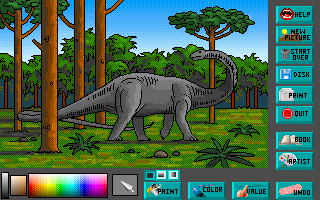
The Color Wizard is an illustrated coloring activity rather than a score chase. Select a book, choose a picture and experiment with its colors. This package contains shareware version 1.2, whose documented limit is the first two pictures from each coloring book.
Use Up and Down to choose a book or picture and Enter to open it. The mouse operates the picture tools and screen icons. Paint fills an area, Color works like a crayon, and Value changes an area's brightness so you can add highlights or shadows.
The book icon opens the picture's story, and another icon offers an art lesson. Save stores work in the program's Art Gallery. Start Over clears the picture, with Undo available if it was accidental. The original program includes printer controls, but this browser page does not provide a connected DOS printer.
Start here
Quick tips
Try Value after filling an area to vary its brightness.
Use Undo if you choose Start Over by mistake.
- Up / Down
- Choose a book or picture
- Enter
- Open the selected book or picture
- Mouse
- Use the coloring tools, palette and screen icons
Screens
Screenshots
Keep playing
Similar Games

Help improve this entry
Something not working?
Report a gameplay or information problem. Short reports are enough.
Archive notes
Rights and Source Notes
Browser play uses the archived Freeware release.
- Distribution
- Freeware
- Browser player
- js-dos · Browser play
- Added to archive
- 2026-07-28