Arcade Volleyball
Saves are stored in this browser.
Player notes
About this game
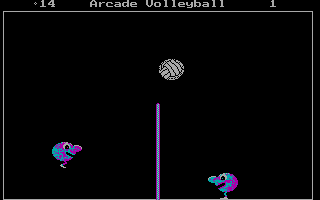
Arcade Volleyball turns a volleyball match into a small court shared by two bouncing characters. Position your player underneath the ball and jump to knock it over the net. The scores remain visible above the court while play continues.
Before choosing Play, open Define Keys. The game asks for player one's Left, Right and Jump keys, then the same three inputs for player two. A useful layout is A, D and W for player one, with Left, Right and Up for player two; these are a suggested setup, not a claim about the original defaults. The menu also offers Keyboard, Joystick, Mouse and Computer choices for each player.
Choose Keyboard for the controls you have defined, then select Play. Begin by learning how far a jump carries the character. Move into the ball's path before jumping instead of chasing it from behind. Sound can be switched from the main menu.
Start here
Quick tips
Define both players’ keys before a keyboard match.
Use separate key groups when two people share a keyboard.
Move underneath the ball before jumping.
- Arrow Up / Arrow Down
- Select an item in the main menu
- Enter
- Confirm a menu choice
- Three keys assigned in Define Keys
- Player one: move left, move right and jump
- Next three keys assigned in Define Keys
- Player two: move left, move right and jump
Screens
Screenshots
Keep playing
Similar Games
Help improve this entry
Something not working?
Report a gameplay or information problem. Short reports are enough.
Archive notes
Rights and Source Notes
Browser play uses the archived Public domain release.
- Distribution
- Public domain
- Browser player
- js-dos · Browser play
- Added to archive
- 2026-07-28