Catch, If You Can!
Saves are stored in this browser.
Player notes
About this game
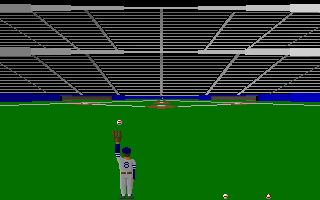
Catch, If You Can! puts a fielder beneath balls hit by a batting coach. Each wave requires a minimum catch percentage: Easy needs 50 percent, Medium 70, Hard 90 and God demands every ball. Start with Easy while learning how glove position changes a catch.
The initial setup needs attention. Open Select Input and choose Keyboard even if Keyboard is already displayed, then define the directions and Button A/B. The original manual explicitly requires this step. Your assigned Button A starts play from the cycling title screens.
Left and Right run sideways; Up raises the glove. Combine Up with a direction for a high running catch, or Down with a direction to hold the glove at that side without running. Press Button A then a direction to dive, and hold Button B to run faster.
Start here
Quick tips
Define the keys under Select Input → Keyboard before the first game.
Do not assign P, S or Escape to movement, because they already have game commands.
- Assigned Left / Right
- Run left / right
- Assigned Up
- Raise the glove
- Assigned Up + Left / Right
- Run with glove overhead
- Assigned Down + Left / Right
- Hold glove to a side while standing
- Assigned Button A
- Start from title; then direction to dive during play
- Assigned Button B (hold)
- Run faster
- P
- Pause / resume
- S
- Toggle sound during play
- Escape
- Return to title cycle; press again to exit
Screens
Screenshots
Keep playing
Similar Games

Help improve this entry
Something not working?
Report a gameplay or information problem. Short reports are enough.
Archive notes
Rights and Source Notes
Browser play uses the archived Shareware release.
- Distribution
- Shareware
- Browser player
- js-dos · Browser play
- Added to archive
- 2026-07-28