Argo Checkers
Saves are stored in this browser.
Player notes
About this game
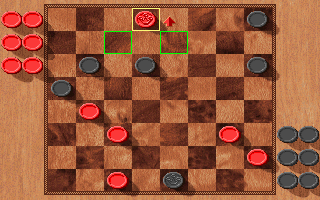
Argo Checkers uses a mouse-driven board with red and black sides. Win by capturing all opposing pieces or leaving the opponent unable to move. Each side starts with twelve pawns on dark squares, and ordinary pawns advance toward the opposite side of the board.
Captures are compulsory. If a jump is available, take it; continue with the same piece when another jump follows. If several capture paths are possible, the help says you do not have to choose the one taking the greatest number of pieces.
Blue outlines identify pieces that can move. Click one to select it. When only one move exists, the game performs it automatically; otherwise the chosen piece becomes yellow and legal destinations appear in green. Click a green square to finish the move. F1 opens the help system, including detailed rules and menu explanations.
Start here
Quick tips
A compulsory capture can make another move unavailable.
A piece with only one legal move may move immediately when clicked.
- F1
- Open context help; within help, show navigation instructions
- Page Up / Page Down
- Previous / next help page
- 1–5
- In help: jump to a section using the main number row
- Escape
- Close help and return
- Click a blue-outlined piece
- Select a piece that can move
- Click a green-outlined square
- Choose a legal destination
- Click elsewhere
- Cancel a selection with multiple move choices
Screens
Screenshots
Keep playing
Similar Games
Help improve this entry
Something not working?
Report a gameplay or information problem. Short reports are enough.
Archive notes
Rights and Source Notes
Browser play uses the archived Shareware release.
- Distribution
- Shareware
- Browser player
- js-dos · Browser play
- Added to archive
- 2026-07-28