Chinese Checkers
Saves are stored in this browser.
Player notes
About this game
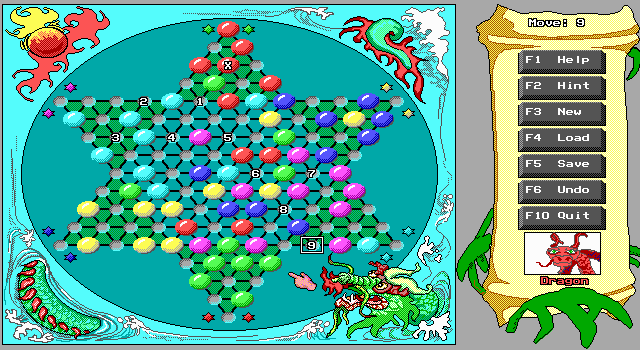
ImagiSOFT's Chinese Checkers asks you to move all your marbles into the opposite point of the board before the other players. This is the shareware edition; the included notes reserve saving and undo for the Deluxe version.
Press Enter through the opening screens. In player selection, Left and Right choose a colour and Up and Down set it to Off, Player or Auto. Player means a human and Auto means the computer. Set up two, three, four or six participants, then confirm with Enter.
During play, select a marble, select its destination and confirm the move. A turn can be a single step or a chain of jumps over individual marbles into empty spaces. The help screen explains how to plot multiple jumps before confirming the final landing. F1 opens that help, and F2 requests a hint.
Start here
Quick tips
Choose at least two participants; Auto assigns a computer opponent.
Confirm the final destination again to execute the plotted move.
- Enter
- Confirm opening screens, player setup and move selections
- Arrow Left / Arrow Right
- Choose a colour in player setup
- Arrow Up / Arrow Down
- Change the selected colour between Off, Player and Auto
- Arrow keys / Home / End / Page Up / Page Down
- Move the board selection during play
- F1
- Open contextual help in setup or play
- F2
- Request a hint during play
- F3
- Start a new game during play
- F10
- Quit
- Left click
- Select a marble and destination squares; confirm the final square to move
Screens
Screenshots
Keep playing
Similar Games
Help improve this entry
Something not working?
Report a gameplay or information problem. Short reports are enough.
Archive notes
Rights and Source Notes
Browser play uses the archived Freeware release.
- Distribution
- Freeware
- Browser player
- js-dos · Browser play
- Added to archive
- 2026-07-28