Cargo Bay
Saves are stored in this browser.
Player notes
About this game
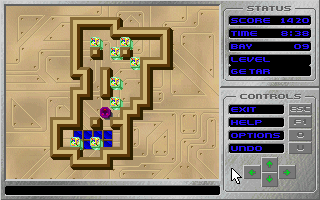
Cargo Bay puts a crate-pushing puzzle aboard the space station Altair-217. As security chief Lt. Marston, you must move explosive cargo onto the shimmering blue beam pads before it detonates. Choose a race and a bay from the main menu, then guide the Grav-Sled around the playfield to push the crates into place.
The controls beside the board provide help, options and undo. U returns to the position before the last push, which is useful when a crate ends up blocking a route. T switches the timer on or off, so you can study a puzzle without the countdown. Options also includes a reset command for returning the bay to its starting arrangement.
This is the shareware edition described in the bundled manual. Its automatic solver works only for the first bay; the full 60-bay solver was a registered-version feature. Mouse buttons on the interface provide an alternative to the printed keyboard shortcuts. F2 opens the original game’s load/save dialog from the main menu.
Start here
Quick tips
Use U after an unhelpful push instead of restarting immediately.
Turn off the timer with T to plan a route without a countdown.
- Arrow keys
- Move the Grav-Sled
- U
- Undo to before the last push
- T
- Toggle the timer during a bay
- O
- Open the in-game options
- F1
- Show help during a bay
- F3
- Show instructions from the menu
- F2
- Open load/save from the main menu
- F5–F8
- Choose one of the four displayed bays
- F9 / F10
- Toggle sound effects / music
- Escape
- Leave the bay or dialog; exit from the main menu
- Left mouse button
- Select a menu item or press an on-screen movement/control button
Screens
Screenshots
Keep playing
Similar Games

Help improve this entry
Something not working?
Report a gameplay or information problem. Short reports are enough.
Archive notes
Rights and Source Notes
Browser play uses the archived Shareware release.
- Distribution
- Shareware
- Browser player
- js-dos · Browser play
- Added to archive
- 2026-07-28