Chopper Commando
Saves are stored in this browser.
Player notes
About this game
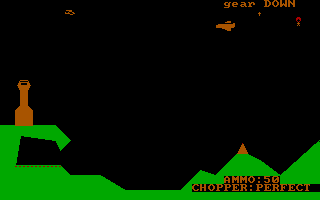
Chopper Commando combines helicopter combat with a persistent pilot roster. Carry out the current mission, protect friendly units and return to base. The supplied source includes the version 2.57 instructions, with separate controls for the helicopter and a pilot on foot.
Use the arrow keys to fly. G or F1 toggles the landing gear; descend slowly onto flat ground with the gear down when landing. B or Insert drops a bomb, Space launches one, M fires a missile and N drops a mega bomb. E or F2 ejects in flight, or lets the pilot leave a landed helicopter.
Begin on the easy difficulty and use S to adjust the game speed. After ejecting, wait for a replacement helicopter; walk into it to board. Auto-eject requires the gear to be up. Keep Caps Lock off for the letter commands.
Start here
Quick tips
Land gently on flat ground with the landing gear down.
Use the easy difficulty while learning, and keep Caps Lock off.
Return to base after completing the assignment.
- Arrow keys
- Fly the helicopter
- G / F1
- Toggle landing gear
- E / F2
- Eject in flight or leave a landed helicopter
- B / Insert
- Drop a bomb
- Space
- Launch a bomb
- M
- Launch a missile
- N
- Drop a mega bomb
- A
- Toggle auto-eject
- Home / Page Up
- Throw grenades while on foot
- T
- Toggle mouse control
- P
- Pause
- S
- Change game speed
- X
- Toggle sound
- Escape
- Quit the game
Screens
Screenshots
Keep playing
Similar Games

Help improve this entry
Something not working?
Report a gameplay or information problem. Short reports are enough.
Archive notes
Rights and Source Notes
Browser play uses the archived Freeware release.
- Distribution
- Freeware
- Browser player
- js-dos · Browser play
- Added to archive
- 2026-07-28