FaceTrex
Saves are stored in this browser.
Player notes
About this game
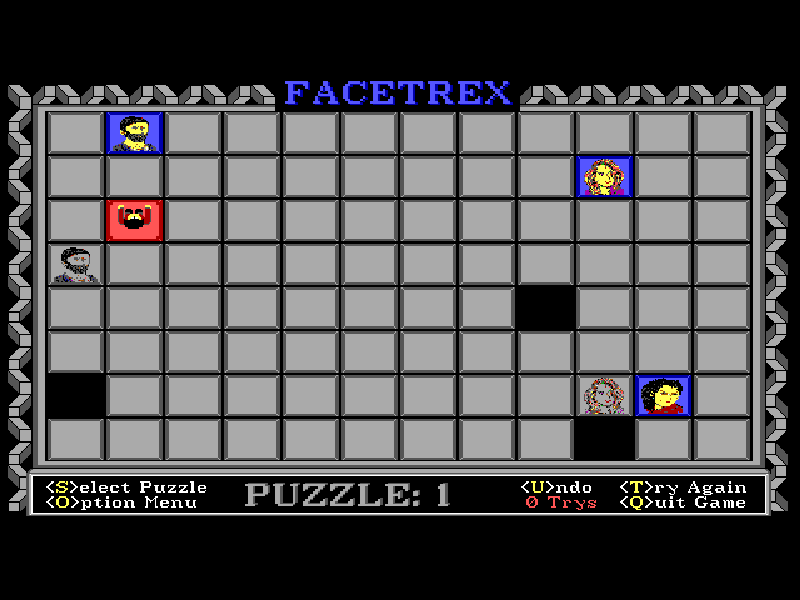
FaceTrex is a grid puzzle about positioning both the player and the pieces that stop a sliding tile. Move the red character with the arrow keys and push each face toward its matching negative image. A face slides until another face or the edge of the board stops it. Once it reaches its matching target, it locks into place and cannot be used as a movable obstacle again.
Later puzzles introduce arrows that redirect sliding faces, green blocks that move one square per push, and fixed black holes that act as walls. Solving a board often depends on arranging those obstacles before committing a face to its final position. Undo takes back the last push, while Try Again restores the current puzzle.
This is FaceTrex 2.0, the 1995 revision of the DOS shareware game first released in 1993. It includes 25 selectable puzzles and built-in solutions for the first five. Press S, choose a puzzle and confirm with Enter to begin. The original artwork, English menus and edition restrictions are preserved.
Start here
Quick tips
Think about where a face will stop, not just the direction you push it.
Do not lock a face onto its target too early if another piece still needs it as a stopper.
Use U to undo a push, or T to restart the current board; solutions for puzzles 1–5 are in the Options menu.
- Arrow keys
- Move the red character and push face tiles
- S
- Open puzzle selection to begin a puzzle
- Enter
- Confirm the selected puzzle
- U
- Undo the last push
- T
- Restart the current puzzle
- O
- Open options, directions and the first five puzzle solutions
- Esc
- Cancel selection or stop a solution demonstration
- Q
- Quit the original game
Keep playing
Similar Games
Ratings & comments
Help improve this entry
Something not working?
Report a gameplay or information problem. Short reports are enough.
Archive notes
Rights and Source Notes
Browser play is available for this entry.
- Distribution
- Shareware
- Browser player
- js-dos · Browser play
- Added to archive
- 2026-11-02
No comments yet. Be the first to share a tip.