Hugo III, Jungle of Doom!
Saves are stored in this browser.
Player notes
About this game
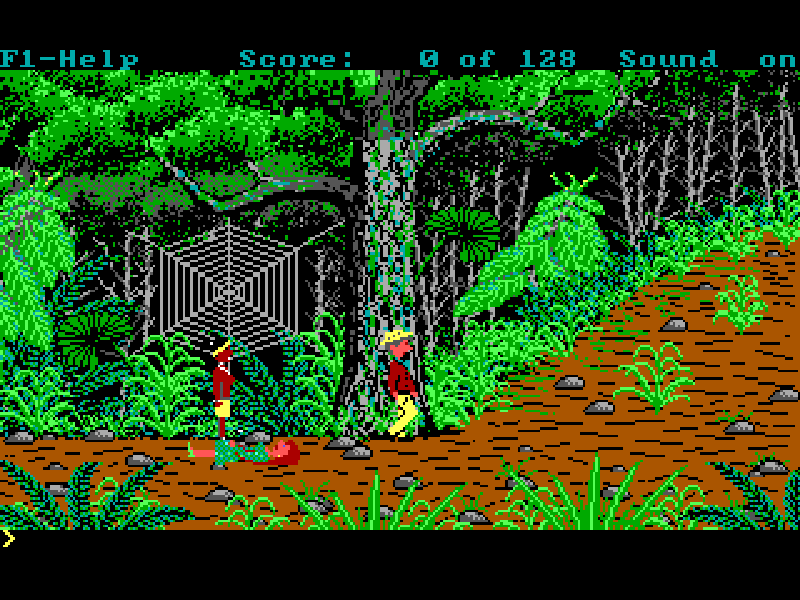
Hugo III, Jungle of Doom! follows a disrupted flight and a forced landing in a jungle clearing. The opening then follows Penelope into trouble with a spider, turning a search for a route home into a rescue. The game retains David P. Gray’s illustrated adventure format while adding a turbo option and built-in hints. Its moving characters and colorful backgrounds still work alongside a typed-command interface.
The opening contains several automatic scenes and messages. Continue the messages and let those scenes finish before testing movement: watching Penelope walk during the introduction does not mean that the arrow keys already control her. Once control returns, guide Hugo along the paths, inspect the surroundings with LOOK, and use inventory to keep track of anything you find. The jungle route and the clearing are distinct locations with their own descriptions.
Use the arrow keys to start walking and press the same direction again to stop; holding a key is not required. Type a short English command such as LOOK, then press Enter. F1 shows the function keys, F6 opens inventory and F3 recalls the previous command for reuse or editing. A physical keyboard is recommended for the text parser. The Chinese page explains the controls, but the game and its commands remain in English.
This is the original DOS 2.1S shareware edition, with its program, English documentation and source archive preserved. It is not a Windows remake or a translated game. F4 saves to one of eight native slots and F5 restores a chosen slot; name a save so that you can recognize it later. The website player’s file-backup feature is separate from those in-game slots. F8 toggles the original turbo mode. Historical registration addresses and offers in the package should not be treated as current services.
Start here
Quick tips
Advance the opening messages and let the automatic story finish before moving Hugo.
Press a direction once to walk and the same direction again to stop.
Start with LOOK; type English commands and press Enter. A physical keyboard is recommended.
Use F4 before an uncertain action; F5 restores a selected native slot.
- Arrow keys
- Start walking; press the same direction again to stop
- English text + Enter
- Type a command such as LOOK and submit it
- Enter
- Continue a message or confirm a selection
- F1
- Show function keys; press again for help
- F2
- Toggle sound
- F3
- Recall the previous command
- F4
- Save to one of eight native slots
- F5
- Restore a native save slot
- F6
- Show inventory
- F8
- Toggle turbo speed
- Esc
- Dismiss help or cancel a prompt
Keep playing
Similar Games
Ratings & comments
Help improve this entry
Something not working?
Report a gameplay or information problem. Short reports are enough.
Archive notes
Rights and Source Notes
Browser play is available for this entry.
- Distribution
- Shareware
- Browser player
- js-dos · Browser play
- Added to archive
- 2026-11-01
No comments yet. Be the first to share a tip.