Framed
Saves are stored in this browser.
Player notes
About this game
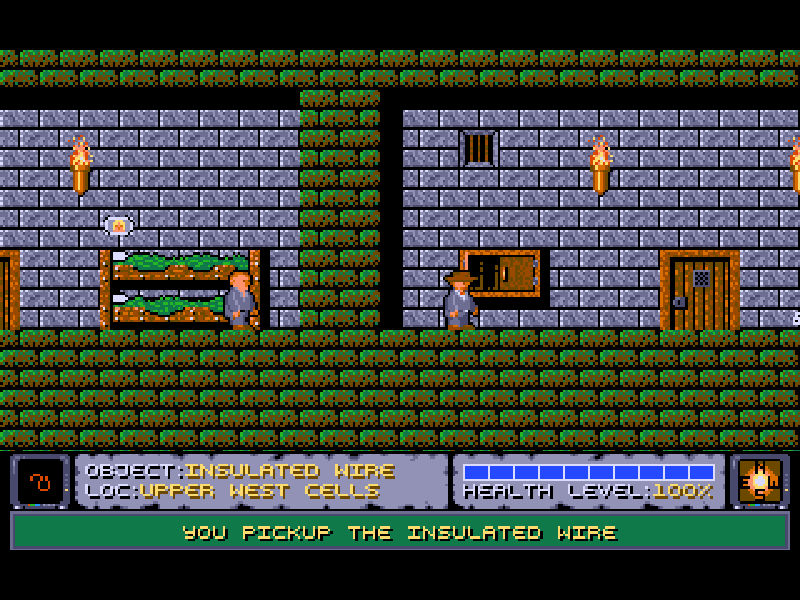
Framed is a side-view DOS adventure from Machination. You begin in a foreign jail with a hazy memory of an arrest for murder. Getting out means looking carefully at the cells, gathering useful objects and discovering how they work together. Walking and jumping matter, but this is a puzzle-led adventure rather than a straightforward action platformer.
Press any key at the title screen, choose Start New Game, then Main Game. Use Left and Right to walk, Up to jump or climb, and Down to climb down. E examines nearby scenery, Space opens or operates things, and P picks up an object. The opening cupboard is a useful place to learn the difference between examining, opening and collecting.
Enter opens the inventory. Arrow keys choose the item to carry, while Ctrl with an arrow chooses a second item for combining. Space tries the pair together; Enter closes the inventory. During play, Alt uses the carried object, D drops it and T throws it. Hold L with the arrows to look around before moving into danger.
This is Framed 1.2, the shareware release of the first scenario set in the jail. The original 1995 package, Machination credits and distribution terms are retained. The later registered scenarios are not included as playable chapters. S opens the original save menu, H pauses, and Esc opens the main menu.
Start here
Quick tips
Choose Start New Game, then Main Game; dismiss both opening text boxes before trying to move.
Try E, Space and P at the cupboard in your starting cell: they perform different actions.
Use the inventory's white selection for carrying and Ctrl plus arrows for the second item to combine.
The opening puzzle involves the camera as well as the locked door. Read GAMEPLAY.DOC from the original documentation menu for its walkthrough.
- Left / Right
- Walk left or right
- Up
- Jump or climb up a ladder
- Down
- Climb down a ladder
- Space
- Open or operate nearby scenery; combine selected inventory objects
- Alt
- Use the currently carried object
- P
- Pick up a nearby object
- Enter
- Open or close the inventory; confirm menu choices
- E
- Examine nearby scenery or the selected inventory object
- Ctrl + Arrow keys
- Choose the second inventory object to combine
- D
- Drop the carried object
- T
- Throw the carried object
- L + Arrow keys
- Look around
- S
- Open the save-game menu
- H
- Pause the game
- Esc
- Open the main menu
Keep playing
Similar Games
Ratings & comments
Help improve this entry
Something not working?
Report a gameplay or information problem. Short reports are enough.
Archive notes
Rights and Source Notes
Browser play is available for this entry.
- Distribution
- Shareware
- Browser player
- js-dos · Browser play
- Added to archive
- 2026-11-01
No comments yet. Be the first to share a tip.