ZZT
Saves are stored in this browser.
Player notes
About this game
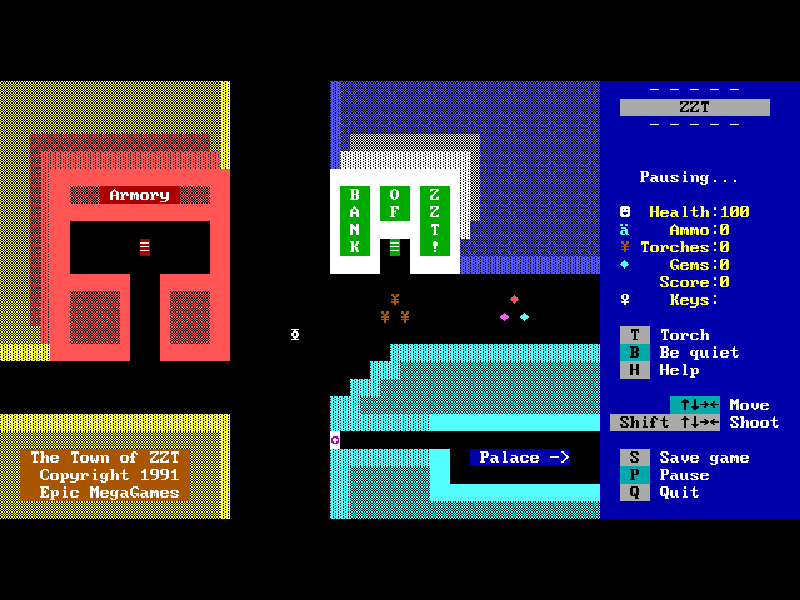
ZZT turns simple text characters into a town full of rooms, creatures, switches and puzzles. Created by Tim Sweeney and published by Epic MegaGames, it mixes exploration with action: touching an object may reveal a message, open a route or put you in danger. The original Town of ZZT is the main adventure in this shareware package.
Move with the four arrow keys. To fire, hold Shift and press the direction you want to shoot; ammunition is required, and the game tells you when you have none. Gems can restore health, while torches help in dark rooms. The right side of the screen keeps your supplies and the important commands visible.
At a fresh start, choose K for keyboard and C for colour. Once Town is loaded, press P to play, then move to leave the initial pause. During play, S saves to a named file, P pauses and Q returns to the title menu after confirmation. Use R on that menu to choose a saved game. Exploring the edge of a room often leads somewhere new.
The bundled program identifies itself as shareware version 3.2, although its README keeps an older 3.1 heading. Town, Demo and Tour files are preserved along with the editor and original documentation. The original About text invites free copying and distribution; this does not make the game public domain or include the separately registered worlds.
Start here
Quick tips
For the initial setup, press K for keyboard and C for colour, then P to play Town.
Shift plus a direction shoots without walking that way, but you need ammunition first.
Save before experimenting with an unfamiliar object or entering a dangerous room.
Try the edges of a room when the route seems blocked; connected boards form the larger world.
- Arrow keys
- Move through the current room
- Shift + Arrow keys
- Shoot in the chosen direction when ammunition is available
- K
- Startup: choose keyboard control
- C
- Startup: choose colour display
- P
- Start from the title menu; pause during play
- S
- Save the current game to a named file
- R
- Restore a saved game from the title menu
- H
- Open help during play
- T
- Light a torch when available
- B
- Toggle game sound
- Q
- Quit to the title menu, or quit the program from its menu
- Enter
- Confirm a filename or menu selection
- Y / N
- Answer a confirmation prompt
Keep playing
Similar Games
Ratings & comments
Help improve this entry
Something not working?
Report a gameplay or information problem. Short reports are enough.
Archive notes
Rights and Source Notes
Browser play is available for this entry.
- Distribution
- Shareware
- Browser player
- js-dos · Browser play
- Added to archive
- 2026-10-31
No comments yet. Be the first to share a tip.