Lure of the Temptress
Saves are stored in this browser.
Player notes
About this game
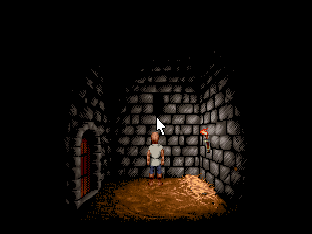
Revolution Software’s 1992 point-and-click adventure begins with Diermot locked in a dungeon after the town of Turnvale falls to the sorceress Selena. Examine the cell, talk to the people around you and work out which objects can help. Townspeople move through the world as you explore.
Click the game on desktop to capture the mouse. Left-click to walk or select and right-click to open the available actions. On touch, drag on the picture to move the cursor, and use the mouse buttons beneath it. To open the File menu, move the cursor to the top. Hold the left button with one finger and drag down with the other, then release on Save game or Restore game.
To save, click the lower filename field, type a short name and click the left button again. On a phone, use More keys → Full keyboard to type. Before closing the page use the player’s Saves → Save game files. To continue, reopen in the same browser, select your entry in the original File → Restore game menu and press Enter.
This release runs the original English DOS executable. If you reach the original protection prompt, the notes supplied with the freeware edition instruct you to choose File → Restart game after the opening.
Start here
Quick tips
Examine the cell door and talk to anyone you can reach.
When saving, click the empty filename field before you type.
- Esc
- Skip parts of the introduction.
- Touchscreen
- Drag on the picture to move the cursor. Hold Left mouse button with one finger and drag with the other for File.
- Left mouse button
- Walk and select. Hold and drag in the top File menu, then release on an item.
- Right mouse button
- Show actions for the person or object under the pointer.
Keep playing
Similar Games
Ratings & comments
Help improve this entry
Something not working?
Report a gameplay or information problem. Short reports are enough.
Archive notes
Rights and Source Notes
Browser play is available for this entry. Official project references are listed below.
- Distribution
- Revolution Software freeware
- Browser player
- js-dos · Browser play
- Added to archive
- 2026-11-17
- Official references
- Source code
- Download open-source code packageSource code only; this is not a game ROM download.
No comments yet. Be the first to share a tip.