Moraff's Stones
Saves are stored in this browser.
Player notes
About this game
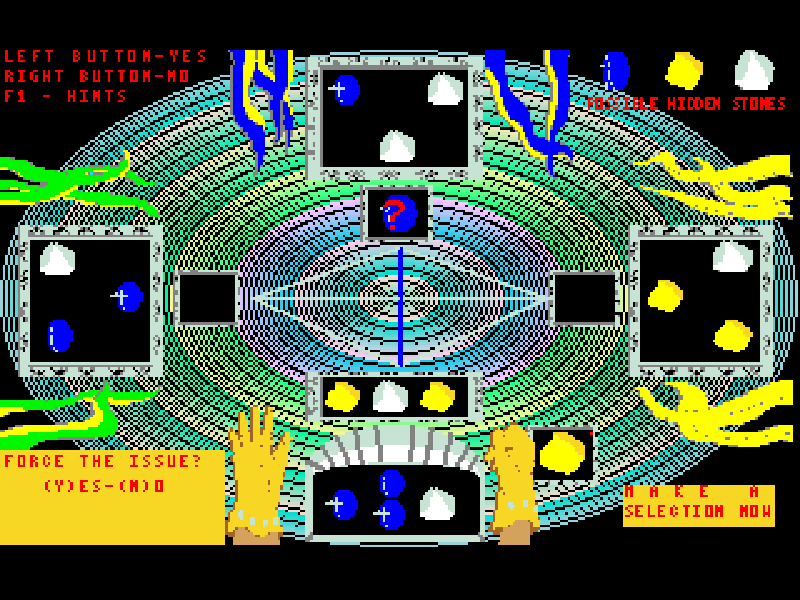
Moraff’s Stones turns a fantasy tavern into a trading table. Each player receives seven stones, with three visible to the other players. Jewel stones are worth more than gold, and gold more than silver. You try to finish a hand with the strongest collection of one type.
A hand lasts twelve trades. Players can make an offer, force a trade using exposed stones, or pass. The original rules explain the entry cost, stone values and bonus for the best collection. F1 supplies a hint for the current decision, making it a useful starting point when the table asks for a choice.
This is the original 3.1 shareware revision dated 25 September 1992, credited to Steve Moraff and Martin Nickel. The series began in 1991. Its silver pieces are fictional in-game counters; the website has no wagering or cash-out feature. Keep the original instructions open for the detailed trading rules.
Start here
Quick tips
Choose 4 for standard color VGA. Answer the sound and text prompts with Y or N; choose Y for text and instructions on your first visit.
Letter commands during trading require uppercase input. Hold Shift with A, L or R to choose an opponent; J, G or S selects a stone type, and P passes where offered.
Use F1 when unsure what the current prompt means. Enter dismisses the hint. Forced trades use exposed stones, not the hidden portion of a hand.
- 4
- Choose standard color VGA at startup.
- Y / N
- Answer yes/no setup prompts.
- Enter
- Continue instructions or dismiss a hint.
- Shift
- Hold with trading letters to send uppercase commands.
- A / L / R
- With Shift held, choose Across, Left or Right at the opponent prompt.
- J / G / S
- With Shift held, choose Jewel, Gold or Silver at the stone prompt.
- P
- With Shift held, pass where the current prompt offers it.
- F1
- Show a hint for the current decision.
- Left mouse button
- Answer yes or continue at matching prompts.
- Right mouse button
- Answer no at matching prompts.
Keep playing
Similar Games
Ratings & comments
Help improve this entry
Something not working?
Report a gameplay or information problem. Short reports are enough.
Archive notes
Rights and Source Notes
Browser play is available for this entry.
- Distribution
- Shareware
- Browser player
- js-dos · Browser play
- Added to archive
- 2026-11-03
No comments yet. Be the first to share a tip.