Crazy Eights
Saves are stored in this browser.
Player notes
About this game
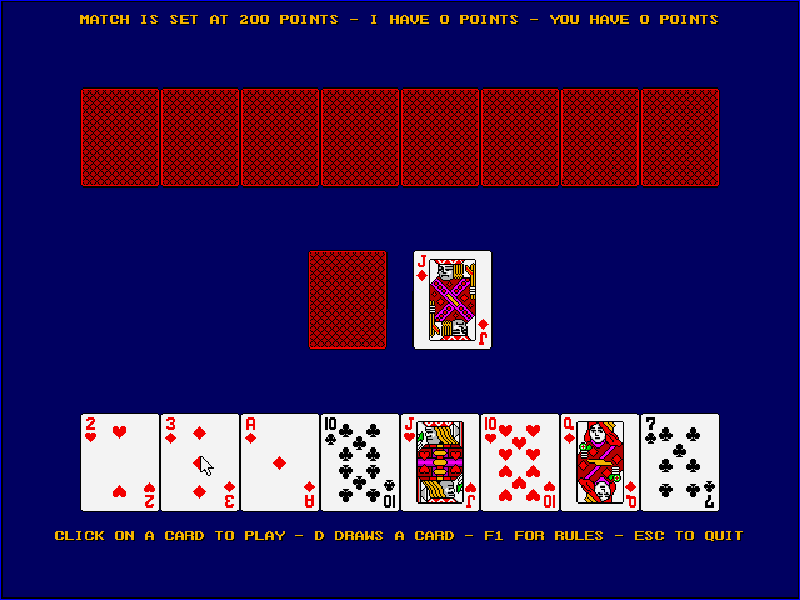
Crazy Eights is a two-player card game against the computer. Each player begins with eight cards. Play a card that matches the suit or rank of the card on the discard pile, or use an eight as a wild card and choose the next suit. The first player to empty their hand wins that round.
When you cannot play, draw from the stock, then play if possible or pass. The program keeps a match score and offers configurable rule variations. Its separate Cribbage entry is a demonstration bundled with the original package; this page launches Crazy Eights.
This is Moonlite Software’s 1992 version 1.0 evaluation shareware. The original package defaults to mouse selection, with keyboard commands for drawing, passing and choosing suits. The original rules, credits and 30-day evaluation notice are preserved; this is not the registered release.
Start here
Quick tips
Choose 1 at the title menu, continue to the table and wait for the deal to finish.
Click a legal card in your hand. D draws; after drawing, P passes when that prompt appears.
After playing an eight, choose C for clubs, D for diamonds, H for hearts or S for spades. F1 explains the original rules.
- 1
- Choose Crazy Eights at the title menu.
- D
- Draw a card, or choose diamonds when selecting a new suit.
- P
- Pass after drawing when the game offers that option.
- C
- Choose clubs after playing an eight.
- H
- Choose hearts after playing an eight.
- S
- Choose spades after playing an eight.
- Space
- Continue the opening prompt.
- F1
- Open the rules.
- Esc
- Leave the rules or open the quit prompt.
- Left mouse button
- Continue prompts and select a card in mouse mode.
Keep playing
Similar Games
Ratings & comments
Help improve this entry
Something not working?
Report a gameplay or information problem. Short reports are enough.
Archive notes
Rights and Source Notes
Browser play is available for this entry.
- Distribution
- Shareware
- Browser player
- js-dos · Browser play
- Added to archive
- 2026-11-03
No comments yet. Be the first to share a tip.