Mah Jongg
Saves are stored in this browser.
Player notes
About this game
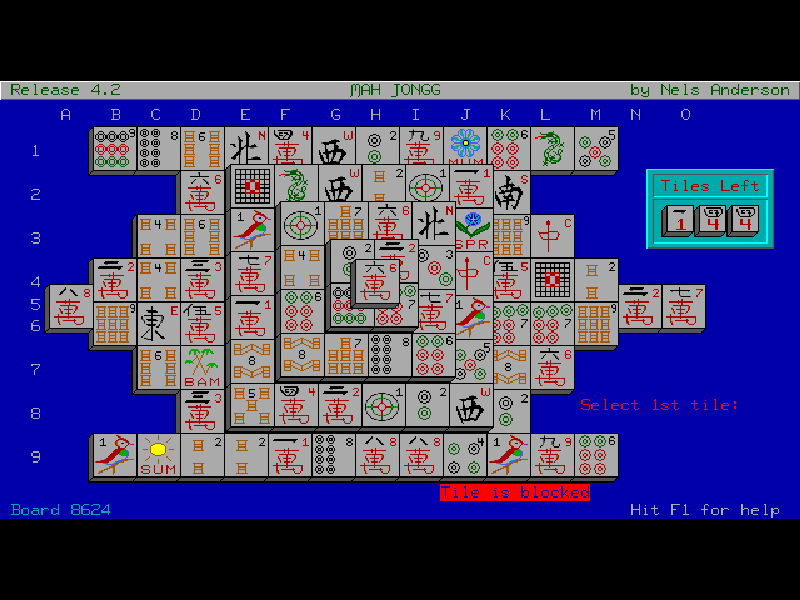
Mah Jongg is a solitaire tile-matching game, rather than the four-player table game. Work through a stacked layout by removing matching pairs. A tile must have no tile on top of it and a clear side to its left or right before you can take it.
Look beyond the first available pair: removing one tile may uncover a useful match, while another choice can leave important tiles trapped. Flowers match other flowers and seasons match other seasons. The game includes hints and undo, as well as numbered layouts that let you return to a particular deal.
This is the 4.2 shareware release from 1994 of Nels Anderson’s game, first released in 1987. Keyboard-mouse mode is enabled here: move the cursor with the arrows and select with Enter. Original shareware restrictions remain, including the restriction on permanently saving changed setup options.
Start here
Quick tips
Press Enter at the opening screen, then wait for all 144 tiles to finish drawing.
Use the arrow keys and Enter to select tiles. A covered tile, or one blocked on both sides, cannot be removed.
Type H and press Enter to ask for a hint. F1 lists the original commands, and F4 undoes the last move.
- Arrow keys
- Move the keyboard-controlled pointer.
- Enter
- Select the tile under the pointer or submit a typed command.
- H
- Type H, then Enter, to find an available pair.
- F1
- Display the command reference.
- F4
- Undo the previous move.
- S
- Type S, then Enter, to save the current game.
- R
- Type R, then Enter, to recall a saved game.
- Q
- Type Q, then Enter, to quit.
Keep playing
Similar Games

Ratings & comments
Help improve this entry
Something not working?
Report a gameplay or information problem. Short reports are enough.
Archive notes
Rights and Source Notes
Browser play is available for this entry.
- Distribution
- Shareware
- Browser player
- js-dos · Browser play
- Added to archive
- 2026-11-03
No comments yet. Be the first to share a tip.