Hexxagon
Saves are stored in this browser.
Player notes
About this game
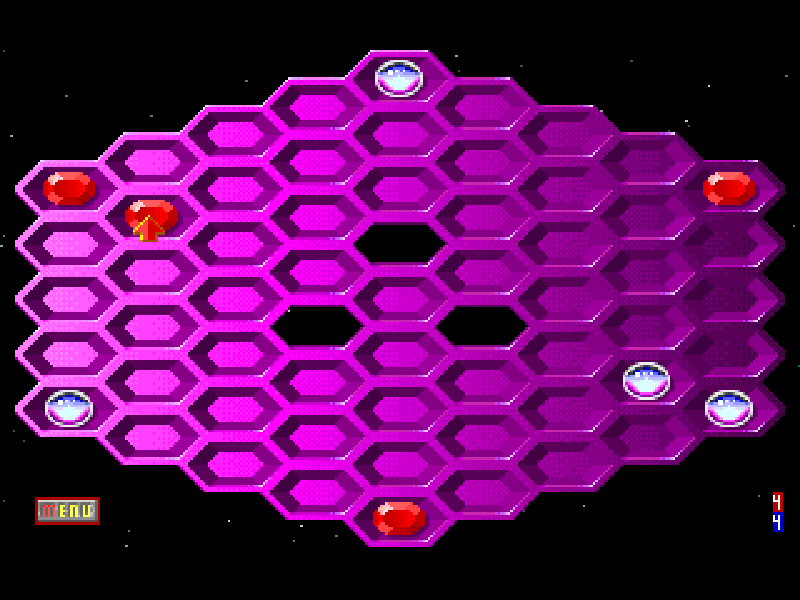
Hexxagon is Argo Games’ animated board game, published by Software Creations. Red jewels and silver drops compete to occupy a board of hexagonal spaces. A move into an adjacent space creates a new piece; a move two spaces away jumps the existing piece. Either move can convert neighboring enemy pieces, so a small opening can change control of a whole corner.
In the main menu, set each side to Human or choose Craniac Easy, Medium or Hard, then select Start Game. The default pairing is a human player against the computer. Click one of your pieces to show its possible moves, then click an available destination. Green outlines indicate cloning moves and yellow outlines indicate jumps. The mouse is the clearest way to select exact spaces.
The original manual recommends filling edges without leaving holes behind your own line. A dramatic capture is not always a good move: check which of your pieces the opponent can take back on the next turn. U undoes a completed move and R redoes it if you have not made a new move. Let Craniac finish responding before using undo.
This page uses unregistered DOS shareware version 1.4. Its original documentation, license and Software Creations credits remain intact. The menu also offers two Human players sharing the same computer; this is a turn-based local option, not online multiplayer. The historical registration material is preserved with the source archive.
Start here
Quick tips
Use the default Human versus Craniac Easy pairing for a first game, then click Start Game.
Click a piece, then a highlighted empty space. An adjacent move clones it; a two-space move leaves its old space empty.
Wait for the computer’s reply before pressing U. R restores an undone move until you choose a different move.
- U
- Undo a completed move
- R
- Redo an undone move
- Mouse
- Point at menu options, pieces and board spaces
- Left mouse button
- Select a piece or confirm its destination
Keep playing
Similar Games
Ratings & comments
Help improve this entry
Something not working?
Report a gameplay or information problem. Short reports are enough.
Archive notes
Rights and Source Notes
Browser play is available for this entry.
- Distribution
- Shareware
- Browser player
- js-dos · Browser play
- Added to archive
- 2026-11-02
No comments yet. Be the first to share a tip.