Numlo
Saves are stored in this browser.
Player notes
About this game
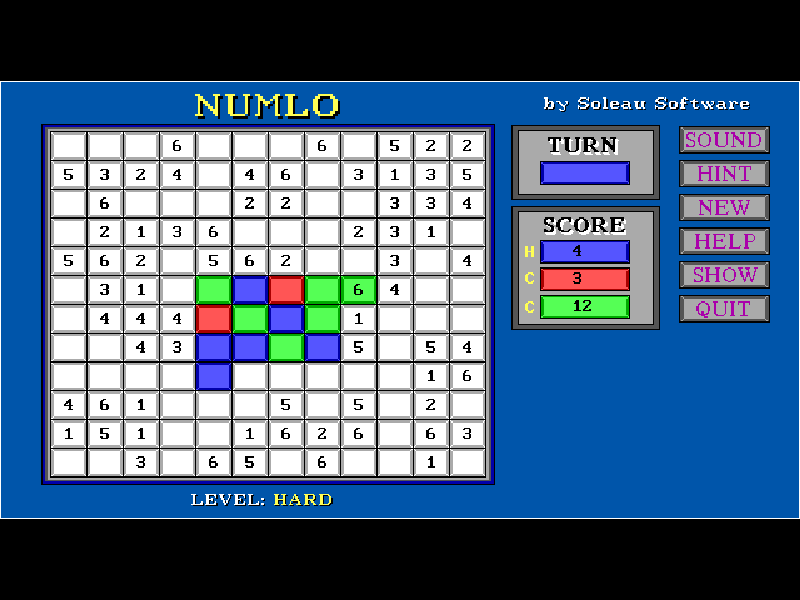
Numlo takes the idea of enclosing an opposing row of pieces and gives it a third color. You play blue against the computer’s red and green sides. Place a piece on an empty square to trap an uninterrupted line of one opposing color between your blue pieces. Lines can run horizontally, vertically or diagonally; a mixture of red and green in the same line cannot be flipped together.
Numbered squares add their values to the score, alongside the squares you control. A large territory can therefore lose to a smaller but more valuable one. The SHOW button marks legal moves, while HINT suggests an immediately profitable move. Those suggestions help you read the board, but do not guarantee the best long-term position.
This is the original DOS shareware release, version 1.0. Choose a computer difficulty with the mouse, click to determine who starts, then place your blue pieces. Play ends when the board is full or no side can move. This edition is a single-player contest against two computer opponents.
Start here
Quick tips
Use SHOW when you cannot spot a legal move; you cannot pass while a valid move exists.
Check numbered squares before chasing the largest group of pieces.
A capturing line must contain just one opponent color. Red and green pieces interrupt one another.
- Left mouse button
- Choose difficulty, draw the starting player and place a piece on an empty square
- Mouse: SHOW
- Highlight all legal moves
- Mouse: HINT
- Show an immediately high-scoring move
- Mouse: NEW / QUIT
- Start a new match or quit the original game
- Mouse: SOUND
- Toggle the original game sound
Keep playing
Similar Games
Ratings & comments
Help improve this entry
Something not working?
Report a gameplay or information problem. Short reports are enough.
Archive notes
Rights and Source Notes
Browser play is available for this entry.
- Distribution
- Shareware
- Browser player
- js-dos · Browser play
- Added to archive
- 2026-11-02
No comments yet. Be the first to share a tip.