Abuse
Saves are stored in this browser.
Player notes
About this game
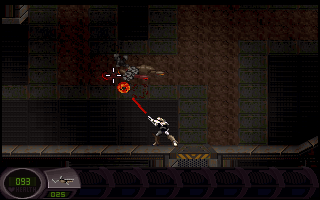
Abuse combines side-view movement with free mouse aiming. The packaged tutorial explains the separation immediately: move the character with the keyboard while pointing the gun toward enemies or targets with the mouse. Left click fires, so you can retreat in one direction while aiming in another.
The Down arrow activates nearby objects, including switches, moving platforms, teleporters and save consoles. Up is used to climb ladders. Watch for the tutorial messages before passing an unfamiliar object; the same movement key can perform an action when you stand in the right place.
The tutorial also introduces shootable switches and destructible hidden walls. Right-click weapon selection and holding the right button for special powers are distinct actions. The bundled ABUSE.DOC concentrates on the level editor, so these player instructions instead follow the game’s own input configuration and tutorial strings.
Start here
Quick tips
Aim with the mouse while moving with the keyboard.
Stand near a console and press Down to use it.
- Arrow Left / Arrow Right
- Move left / right
- Arrow Up
- Upward movement; climb ladders
- Arrow Down
- Activate nearby switches, platforms, teleporters and save consoles
- Ctrl / Insert
- Cycle weapons using the legacy keyboard shortcuts
- Move mouse
- Aim the weapon
- Left click
- Fire
- Right click
- Select weapons as introduced by the tutorial
- Hold right button
- Use the current special power
Screens
Screenshots
Keep playing
Similar Games
Help improve this entry
Something not working?
Report a gameplay or information problem. Short reports are enough.
Archive notes
Rights and Source Notes
Browser play uses the archived Freeware release. Official project references are listed below.
- Distribution
- Freeware
- Browser player
- js-dos · Browser play
- Added to archive
- 2026-07-28
- Official references