Alien Carnage
Saves are stored in this browser.
Player notes
About this game
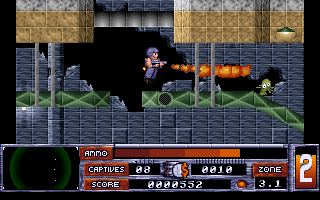
This archived Alien Carnage entry runs the Halloween Harry version 1.2 shareware episode. Guide Harry through the office complex, fighting aliens and searching for captives. The status bar shows energy, ammunition, time and captives still to find. Mission 1 is available in this package; the other mission panels are not selectable full episodes.
If the configuration screen appears first, review its sound settings and press Enter to continue. From the main menu choose Play Game, select a difficulty and choose Mission 1. The default keyboard layout uses the arrows for direction, Alt to fire and Ctrl for jetpack thrust. F1 opens help, F2 saves and P pauses.
Check the captive counter before trying to leave a zone. The game's own messages explain that a switch is activated by standing over it and firing; at a weapon machine, use Up with Fire. Read the illustrated Instructions from the menu for the status bar and additional commands, and conserve ammunition while exploring.
Start here
Quick tips
This package contains the Halloween Harry v1.2 shareware mission.
Use R to locate captives on the radar before leaving a zone.
The jetpack shares fuel with the flamethrower; a low supply can interrupt flight.
- Arrow keys
- Choose menus and control Harry’s direction
- Enter
- Confirm the highlighted menu choice
- Alt
- Fire the current weapon
- Ctrl / Arrow Up
- Use jetpack thrust; Up also operates a lift when positioned in front of it
- Arrow Up + Alt
- Use the weapon machine when positioned in front of it
- 1–6
- Select a weapon
- Space
- Cycle through available weapons
- R
- Toggle the hostage radar
- F1
- Show help
- F2
- Save the game
- P
- Pause
- Escape
- Ask to abort the current game
Screens
Screenshots
Keep playing
Similar Games
Help improve this entry
Something not working?
Report a gameplay or information problem. Short reports are enough.
Archive notes
Rights and Source Notes
Browser play uses the archived Freeware release.
- Distribution
- Freeware
- Browser player
- js-dos · Browser play
- Added to archive
- 2026-07-28