LMarbles
Save behavior varies by game. Check the notes below.
Player notes
About this game
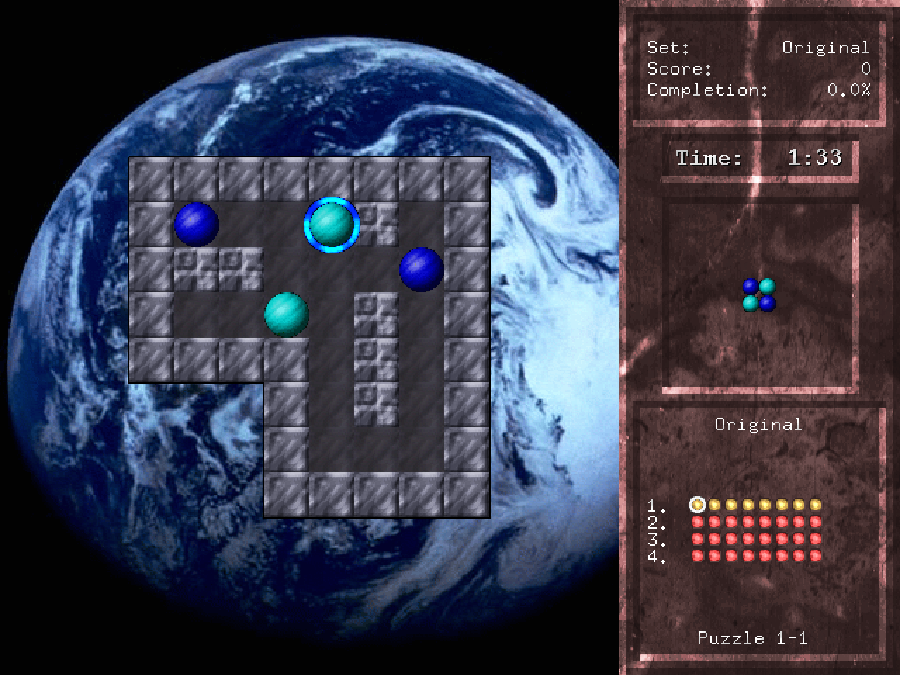
LMarbles is a sliding puzzle by Michael Speck, first developed in 2000. Arrange the colored marbles to match the small pattern shown beside the board. A marble keeps moving until a wall or another marble stops it; finding a clear route is only half the puzzle, because you also need something in the right place to stop the next move. Later boards introduce obstacles such as crumbling walls.
This browser edition uses the author’s 1.2 SDL2 release. Its Original set has 32 puzzles across four chapters, with time-limited and move-limited modes and three visual themes. Michael Speck continues to maintain the native game; this project adapts that source for browsers rather than presenting it as abandoned software. The game’s own menus remain in English.
Choose New Game, then Start. Click or tap a marble to select it, then press an arrow key or a direction on the touch controller to slide it. Space undoes the last move when allowed; a move that breaks a crumbling wall cannot be undone. R restarts a board after confirmation, P pauses, and Esc asks whether to leave the current puzzle. Answer confirmation prompts with Y or N, available through More keys on the touch controller.
Completed puzzle ratings, chapter unlocks, scores and settings are saved in this browser on this site. An unfinished board is not an instant save: returning to it starts that puzzle again. Clearing browser data removes the local profile. Use Saves to upload a cloud backup manually and restore it on another device. Sound starts muted and can be enabled from the player.
The browser adaptation adds cooperative rendering, direct touch selection, the shared on-screen controller, pause, real audio mute and isolated local storage. The original authors, license notices and corresponding source are linked below. Acceptance covers solving the first puzzle, undo, audio, exit and restoring its recorded result after closing the browser; it does not certify all 32 puzzles or every physical phone.
Start here
Quick tips
Choose New Game → Start. To try a different constraint, change Limit to Moves or Time before starting.
Tap a marble first, then choose a direction. It will slide until a wall or another marble stops it.
Use other marbles as temporary stops. Moving one piece out of the way too early can make the target pattern harder to reach.
Space undoes the last move, except after breaking a crumbling wall. R restarts the board; confirm with Y or cancel with N.
Finish the puzzle and its score screen to record the result. Returning later preserves completed results, not a partially arranged board.
- Arrow keys
- Move the selected marble; navigate or change menu choices
- Space
- Undo the last move unless it broke a crumbling wall
- P
- Pause or resume the game
- R
- Restart the current puzzle after confirmation
- Enter
- Confirm a menu choice or continue the score screen
- Esc
- Leave the puzzle after confirmation; go back or quit from menus
- Y
- Confirm a restart or exit question
- N
- Cancel a restart or exit question
- Left mouse button / tap
- Select a marble; clicking on one of its four sides also chooses its sliding direction
Keep playing
Similar Games
Ratings & comments
Help improve this entry
Something not working?
Report a gameplay or information problem. Short reports are enough.
Archive notes
Rights and Source Notes
Browser play is available for this entry. Official project references are listed below.
- Distribution
- Source restoration
- Browser player
- WebAssembly · Browser play
- Added to archive
- 2026-10-24
- Official references
- Source code
- Download open-source code packageSource code only; this is not a game ROM download.
No comments yet. Be the first to share a tip.