Mah Jongg LapTop
Saves are stored in this browser.
Player notes
About this game
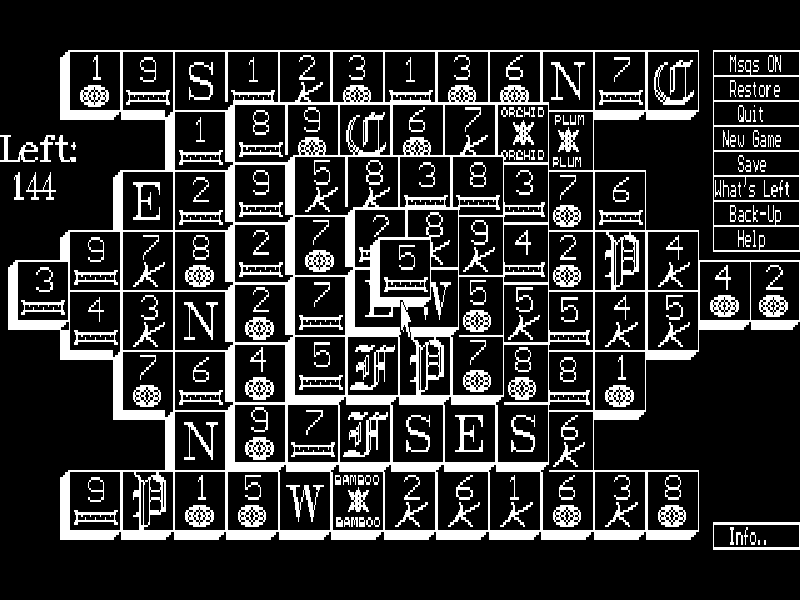
Mah Jongg LapTop adapts tile-matching solitaire to the black-and-white displays of early portable PCs. Its letters, numbers and simple symbols distinguish the suits without relying on colour. Clear the stacked layout by removing matching pairs, but only tiles with no tile above and an open left or right side are free to move.
Point at a free tile and left-click it, then select its matching partner. Click a selected tile again to cancel. Flowers match other flowers and seasons match other seasons even when their pictures differ. The counter on the left tracks the remaining tiles, and the game rejects blocked or mismatched selections.
The right-hand menu includes Help, Back-Up, Save and Restore. Help can show available pairs; its Do It command removes the displayed pair. Back-Up takes back a move, giving you room to reconsider which tiles to uncover. This page uses Ron Balewski’s original 1989 version 1.1 package, preserving its documentation, tile files and shareware notice. It is a solitaire matching game, not a four-player mahjong ruleset.
Start here
Quick tips
Wait for the title to clear and the tile layout to appear. Left-click two free matching tiles; a tile needs space on at least one side.
Try to uncover the top tile and clear the isolated edge tiles. Removing a pair that blocks access to its remaining twins can leave you stuck.
Help → Next cycles through available pairs and Do It removes the shown pair. Back-Up undoes a move; Save and Restore are the original local game functions.
- Mouse
- Move the pointer to a tile or a menu option.
- Left mouse button
- Select or deselect tiles and activate menu options.
Keep playing
Similar Games
Ratings & comments
Help improve this entry
Something not working?
Report a gameplay or information problem. Short reports are enough.
Archive notes
Rights and Source Notes
Browser play is available for this entry.
- Distribution
- Shareware
- Browser player
- js-dos · Browser play
- Added to archive
- 2026-11-04
No comments yet. Be the first to share a tip.