Sherlock
Saves are stored in this browser.
Player notes
About this game
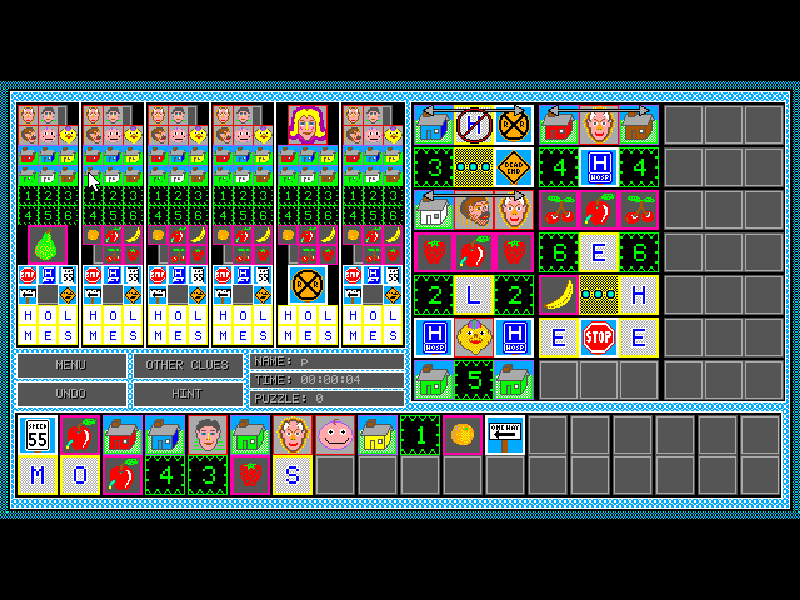
Sherlock turns the familiar houses-and-clues logic puzzle into a graphical DOS game. Each of the six rows contains a different set of pictures, and your task is to work out which column each picture belongs in. Some clues connect items in the same column; others describe neighbours, left-to-right order or an item between two others. Small pictures are possibilities, while a large picture marks a chosen position.
This version requires a mouse. On a fresh start, click New Player, type a name and press Enter, then click Done and Play. Wait for the clues to finish generating before making deductions. Right-click a small picture to rule it out; left-click one when you believe its position is certain. The game checks the completed arrangement, so a confident-looking selection can still be wrong.
Undo can retrace recent decisions. Hint explains a deduction but adds thirty seconds to your time, making it useful for learning the clue symbols rather than for a fast result. This is Everett Kaser’s November 1991 version 1.2 shareware package, including its original manual and seven-day evaluation notice. The English puzzle interface is unchanged; the website provides Chinese guidance alongside it.
Start here
Quick tips
First launch: New Player → enter a name → Enter → Done → Play. Give the game a few seconds to generate its clues.
Start with any large pictures already fixed on the board. Right-click to remove possibilities and left-click to commit a position.
Use Undo after a mistaken click. Hint explains the next deduction and adds a time penalty; read the relationship symbols carefully.
- Enter
- Confirm a new player name.
- Mouse
- Move the pointer over pictures, clues and menu buttons.
- Left mouse button
- Select menus or confirm a picture in a board position.
- Right mouse button
- Remove a possible picture from a board position.
Keep playing
Similar Games
Ratings & comments
Help improve this entry
Something not working?
Report a gameplay or information problem. Short reports are enough.
Archive notes
Rights and Source Notes
Browser play is available for this entry.
- Distribution
- Shareware
- Browser player
- js-dos · Browser play
- Added to archive
- 2026-11-04
No comments yet. Be the first to share a tip.