Monchr
Saves are stored in this browser.
Player notes
About this game
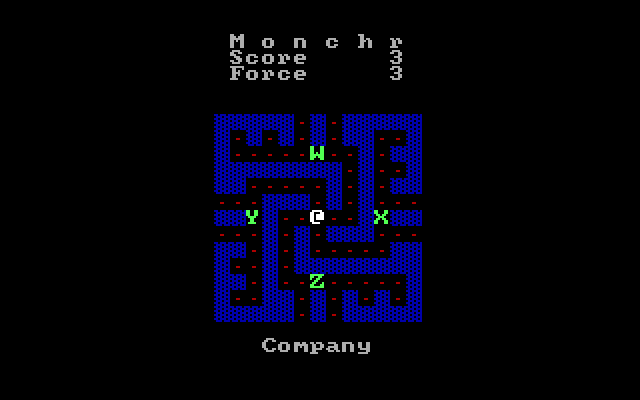
Monchr asks you to clear every dot in a maze while staying away from monsters. Its simple presentation is a tribute to the games Terry Washington encountered while learning to program on early computer terminals. That early-computer influence is reflected in the spare maze layout and emphasis on choosing a safe route.
The included version 1.0 instructions are dated August 21, 2000. They describe a QuickBASIC game designed to recall that earlier period. Movement is the main tool for survival: watch the monsters and remaining dots before committing to a passage.
Turn Num Lock on and use the numeric keypad: 8 moves up, 5 moves down, 4 moves left and 6 moves right. The unusual part is 2, which stops movement instead of moving down. Keep that distinction in mind when approaching a junction or looking for a moment to plan a safe route. Escape exits the game.
Start here
Quick tips
Use the numeric keypad with Num Lock on; the documented down key is 5.
Keypad 2 stops movement, which can help you plan at a safe point in the maze.
- Keypad 8
- Move up (Num Lock on)
- Keypad 5
- Move down
- Keypad 4
- Move left
- Keypad 6
- Move right
- Keypad 2
- Stop moving
- Esc
- Exit
Screens
Screenshots
Keep playing
Similar Games
Help improve this entry
Something not working?
Report a gameplay or information problem. Short reports are enough.
Archive notes
Rights and Source Notes
Browser play uses the archived Freeware release.
- Distribution
- Freeware
- Browser player
- js-dos · Browser play
- Added to archive
- 2026-07-27