Nitemare-3D
Saves are stored in this browser.
Player notes
About this game
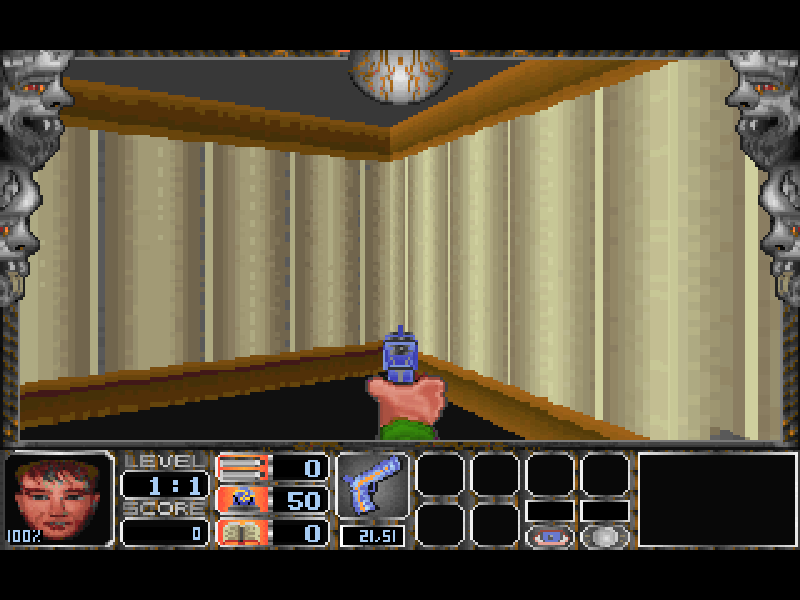
Nitemare-3D takes Hugo into a first-person adventure through the house of Dr. Hamerstein. Penelope has been kidnapped, and finding her means exploring rooms full of monsters, locked routes and hidden panels. The haunted-house setting comes from Gray Design Associates, the creator of the earlier Hugo adventures. Here, looking around and working out how rooms connect matter alongside fighting what is inside them.
Start a New game, choose Episode 1 and select a difficulty. The opening room does not immediately put a weapon in your hand: look for the blue pistol and walk over it. The arrow keys move and turn, Ctrl fires, and Space opens doors or interacts with curtains. Hold Alt with Left or Right to sidestep. The original controls distinguish the two Shift keys: Right Shift makes you move faster, while Left Shift slows movement.
F1 opens the original help. Number keys 1–4 select available weapons, F4 is quick save and F5 is quick load. F9 and F10 control the wall and enemy map displays; Tab shows a status report. These are original game commands, separate from the website player’s file backup. The help also explains secret panels and collectibles, so it is useful when the next doorway is not obvious.
This is the DOS 2.0 shareware release of Episode 1, A House of Horrors. Episodes 2 and 3 are listed in the original menu but are not included in this shareware package. The original archive, English help and author credits are preserved. Historical order forms remain part of that archive; they do not establish a current purchasing service.
Start here
Quick tips
Choose New game → Episode 1, then a difficulty; start with Be gentle! if you are learning the controls.
Pick up the blue pistol in the opening room before trying Ctrl. The ammunition counter confirms you have it.
Use Space at doors and curtains. Keep the original F1 help handy for hidden panels and map functions.
- Arrow keys
- Move forward/backward and turn; navigate menus
- Ctrl
- Fire the selected weapon
- Space
- Open doors and interact with curtains
- Alt + Left / Right
- Sidestep left / right
- Right Shift
- Move faster while held
- Left Shift
- Move more slowly while held
- 1 / 2 / 3 / 4
- Select an available weapon
- Enter
- Confirm a menu choice or continue
- F1
- Open the original help
- F4
- Quick save in the original game
- F5
- Quick load in the original game
- F9
- Show the wall map
- F10
- Show the enemy map
- Tab
- Show the status report
- Esc
- Leave a menu or open the exit options
Keep playing
Similar Games
Ratings & comments
Help improve this entry
Something not working?
Report a gameplay or information problem. Short reports are enough.
Archive notes
Rights and Source Notes
Browser play is available for this entry.
- Distribution
- Shareware
- Browser player
- js-dos · Browser play
- Added to archive
- 2026-11-02
No comments yet. Be the first to share a tip.