Doom
Saves are stored in this browser.
Player notes
About this game
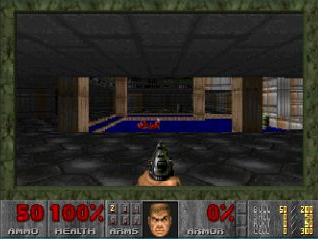
Doom is id Software’s 1993 first-person shooter. This browser edition runs the original DOS version 1.9 shareware package, with DOOM1.WAD and its accompanying files. It contains Knee-Deep in the Dead, the first episode, rather than the full commercial game.
Start a new game from the menu, select the first episode and choose a difficulty. Explore the rooms, collect ammunition and health, and look for switches and colored keys that open routes toward the exit. Check the status bar before rushing into another fight.
The default keyboard layout uses the arrow keys to move and turn, Ctrl to fire, Space to use doors and switches, and Alt with a direction to strafe. The control reference describes this original DOS layout, not modern mouse-look controls.
Only the shareware episode is included. The other episodes shown in the menu require the registered game. Browser play here is single-player; the original package’s network utilities do not provide an online multiplayer service.
Hold Shift to run and use Tab to toggle the automap. F1 opens the original help; F2 and F3 open the game’s save and load menus. After making a save inside Doom, use the browser player’s Save button to preserve changed files on this device. This is separate from a cloud account or rewind feature.
Want the full version? Buy on GOG
Start here
Quick tips
Select Knee-Deep in the Dead when starting a new game; later episodes are not included.
Use Space near a door or switch, and watch for colored keys that match locked doors.
Keep an eye on ammunition and health, and try an easier difficulty while learning the original controls.
- Arrow keys
- Move and turn
- Ctrl
- Fire
- Space
- Open doors and use switches
- Alt + direction
- Strafe
- Shift
- Hold to run
- Tab
- Toggle automap
- 1 / 2 / 3 / 4 / 5 / 6 / 7
- Select an owned weapon; not every weapon is in the shareware episode
- Esc
- Open the game menu
- F1
- Open original help
- F2 / F3
- Save / load using the original game menu
Keep playing
Similar Games
Ratings & comments
Help improve this entry
Something not working?
Report a gameplay or information problem. Short reports are enough.
Archive notes
Rights and Source Notes
Browser play is available for this entry.
- Distribution
- Shareware episode
- Browser player
- js-dos · Browser play
- Added to archive
- 2026-10-14
No comments yet. Be the first to share a tip.