Scorched Earth
Saves are stored in this browser.
Player notes
About this game
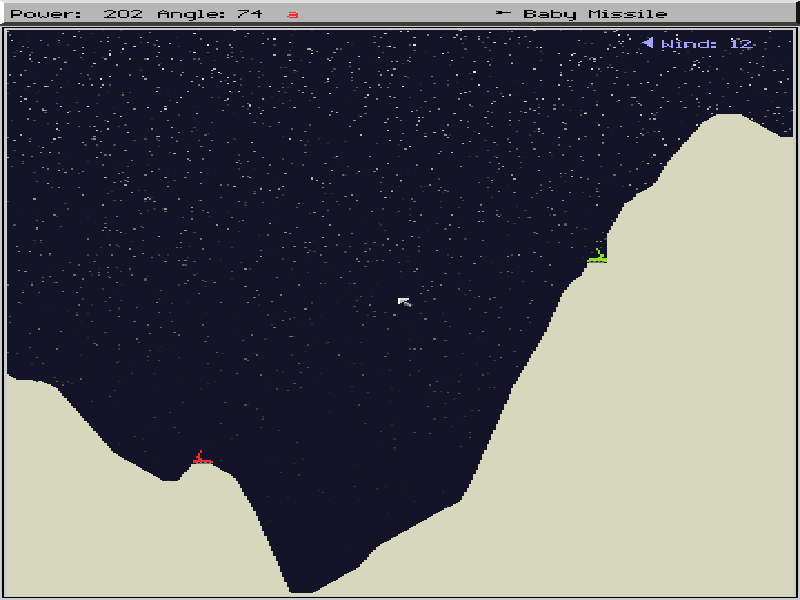
Scorched Earth is a turn-based artillery game by Wendell Hicken. Tanks sit on opposite slopes of a randomly generated landscape, and each shot is a small calculation: how far away is the target, how high is the intervening hill, and which way is the wind blowing? Explosions carve into the terrain, so a useful firing solution may not last.
Angle and power matter more than fast reactions. Start with the ordinary Baby Missile, watch where it lands and adjust the next shot. Later rounds introduce buying decisions: different weapons and defensive equipment can change the balance of a match. The original game supports human and computer opponents, with up to ten tanks taking turns.
At the main menu, press S to begin. For a human player, enter a name; press N first if the Name field has no cursor. Press Enter to finish typing, then D to finish that player's setup. Tab switches between human and computer setup. In battle, Left and Right change the turret angle, Up and Down change power, and Space fires.
This page runs the DOS 1.5 shareware edition, released in 1995, of the game first released in 1991. Shareware was distributed for players to try before registering; this is not a registered edition. The original twenty-file package, manual and distribution notice are preserved.
Start here
Quick tips
Give at least one tank a human player's name; a match made entirely of computer players will play itself.
Use a simple two-tank match to learn aiming. Watch the wind indicator and change one setting at a time after a miss.
On a phone, open More keys / keyboard to enter a name and reach setup shortcuts. A physical keyboard makes the setup quicker.
F1 opens the system menu. Finish the current shot before trying to change settings.
- Left / Right
- Turn the turret left or right to adjust the firing angle
- Up / Down
- Increase or decrease firing power
- Space
- Fire the selected weapon
- S
- Start a new game from the main menu
- N
- Focus the Name field during human-player setup
- A–Z
- Type a player name in the Name field
- Enter
- Finish typing a name; confirm a selected option
- D
- Finish the current player's setup
- Tab
- Switch human/computer setup; cycle weapons during battle
- T
- Open the tank control panel
- F1
- Open the system menu
- Esc
- Close the current menu or cancel name entry
Keep playing
Similar Games
Help improve this entry
Something not working?
Report a gameplay or information problem. Short reports are enough.
Archive notes
Rights and Source Notes
Browser play is available for this entry.
- Distribution
- Shareware
- Browser player
- js-dos · Browser play
- Added to archive
- 2026-10-17