Scramble
Saves are stored in this browser.
Player notes
About this game
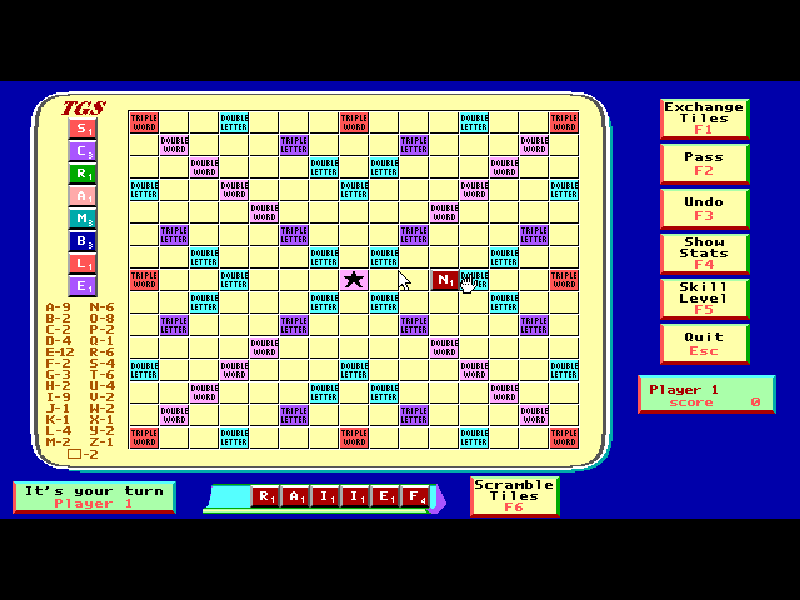
Scramble is Diana Gruber’s word-building board game, published by Ted Gruber Software. Place letters from your rack in a straight line, connect new words to existing tiles and make use of letter and word bonuses. The first word must cross the star in the center.
Choose one to four players, then decide which seats are human or computer controlled. One player gives you a solitaire game; two players can pair you with the computer. This is an English word game, using the original supplied dictionary, rather than the arcade shooter with the same name.
This page runs the complete original version 1.2 shareware distribution from July 1991. Select a rack letter, position the hand cursor and press Enter to place it. After placing your word, Enter with no tile selected submits the turn. Original dictionary tools, documentation and author credits are retained.
Start here
Quick tips
Choose the player count and check each seat before confirming. Number keys can switch a seat between human and computer.
Select a rack tile by its letter or position number, move with arrows and press Enter to place it. Press Enter again with no tile selected to finish the word.
F3 undoes the current placement, F1 exchanges tiles and F2 passes. The first word needs to touch the center star.
- Arrow keys
- Move the hand cursor across the board.
- A–Z / 1–7
- Select a letter from the rack, by letter or rack position.
- Enter
- Confirm setup; place the selected tile; with no tile selected, submit the word.
- F1
- Exchange tiles.
- F2
- Pass the turn.
- F3
- Undo the current placement.
- F4
- Show game statistics.
- F5
- Choose computer skill level.
- F6
- Rearrange the rack.
- Esc
- Quit the game.
- Left mouse button
- Select a rack tile or place it on the board.
- Right mouse button
- Confirm or place a tile, like Enter.
Keep playing
Similar Games
Ratings & comments
Help improve this entry
Something not working?
Report a gameplay or information problem. Short reports are enough.
Archive notes
Rights and Source Notes
Browser play is available for this entry.
- Distribution
- Shareware
- Browser player
- js-dos · Browser play
- Added to archive
- 2026-11-04
No comments yet. Be the first to share a tip.