Scubaman's Quest
Saves are stored in this browser.
Player notes
About this game
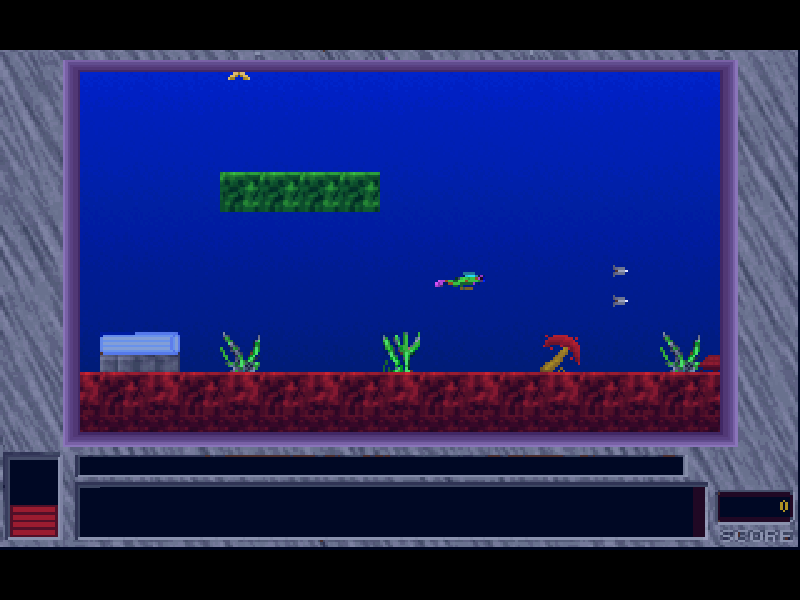
Scubaman’s Quest is Alive Software’s scrolling underwater arcade game. Swim through the level, gather treasures and marine specimens, avoid hazards and find the exit. Hearts replenish health, while mines and hostile creatures make careless movement costly.
Movement and firing are separate: the arrow keys steer, Ctrl boosts forward, Alt fires straight and Shift fires a double diagonal shot. The original manual recommends using the weapon against mines and collecting valuable items along the route. F1 brings up a short control reminder.
This page runs version 4.0 from April 1996 of the game first released in 1994. It is evaluation shareware containing Golden Gates, Dark Cave and Mutant Jelly-fish. The remaining seven episodes and registered extras are not included. Alive Software’s original files, credits and registration information are preserved.
Start here
Quick tips
Continue through the original opening screens, choose Golden Gates and select Start New Game. Allow the level to finish loading before moving.
Use short directional movements around hazards. Ctrl boosts forward; Alt and Shift fire different patterns.
Look for hearts when health is low. The complete ten-episode game mentioned in the original ordering screens is a separate registered release.
- Arrow keys
- Move the diver in four directions; also select menu entries.
- Ctrl
- Boost forward.
- Alt
- Fire a straight shot.
- Shift
- Fire two diagonal shots.
- Enter
- Confirm an episode or menu choice; continue opening screens.
- F1
- Open the brief control help.
- Esc
- Return from gameplay to the main menu, or exit at the episode screen.
Keep playing
Similar Games
Ratings & comments
Help improve this entry
Something not working?
Report a gameplay or information problem. Short reports are enough.
Archive notes
Rights and Source Notes
Browser play is available for this entry.
- Distribution
- Shareware
- Browser player
- js-dos · Browser play
- Added to archive
- 2026-11-03
No comments yet. Be the first to share a tip.