Second Guess
Saves are stored in this browser.
Player notes
About this game
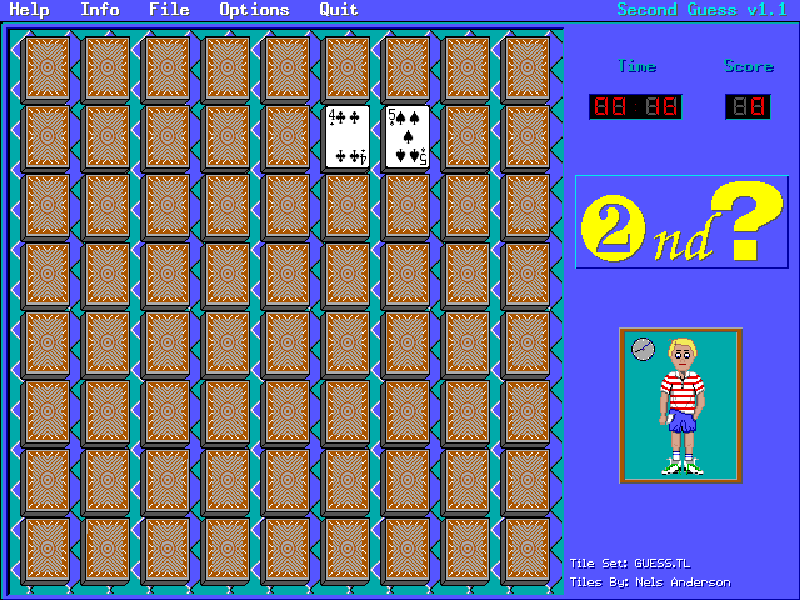
Second Guess is a memory game with face-down tiles and adjustable board settings. Reveal two tiles, remember their pictures and find matching pairs. Depending on the chosen rules, a pair disappears or stays face up; the game tracks time and score.
The original program supports solo play, an optional computer opponent and local turn-taking for two to four players. Keyboard play moves the pointing hand with the arrow keys and flips a tile with Enter or Space. Mouse selection is also supported. Options include different tile sets and scoring variations.
This is Nels Anderson’s 1.1 release from July 1995, following the original 1994 game published by Arcanum Computing. It is shareware: the original package is supplied for evaluation, with continued-use registration described in its documentation. All bundled files and notices are retained, including the separate Tile Factory tool; this page starts the game itself.
Start here
Quick tips
Continue past the title screen and wait for the tile board to appear. Move the finger to a tile with the arrow keys, then press Enter or Space.
Watch both tiles when a pair fails. Their display time can be adjusted in the original setup menu.
F1 opens Help; F4 opens Options and F10 quits. The two-to-four-player modes take turns on the same computer, not over a network.
- Arrow keys
- Move the tile-selection hand across the board; navigate menus.
- Enter / Space
- Flip the selected tile or confirm a choice.
- F1
- Open Help.
- F4
- Open Options.
- F10
- Quit the game.
- Left mouse button
- Select tiles and menu commands.
Keep playing
Similar Games
Ratings & comments
Help improve this entry
Something not working?
Report a gameplay or information problem. Short reports are enough.
Archive notes
Rights and Source Notes
Browser play is available for this entry.
- Distribution
- Shareware
- Browser player
- js-dos · Browser play
- Added to archive
- 2026-11-03
No comments yet. Be the first to share a tip.