Crazy Shuffle
Saves are stored in this browser.
Player notes
About this game
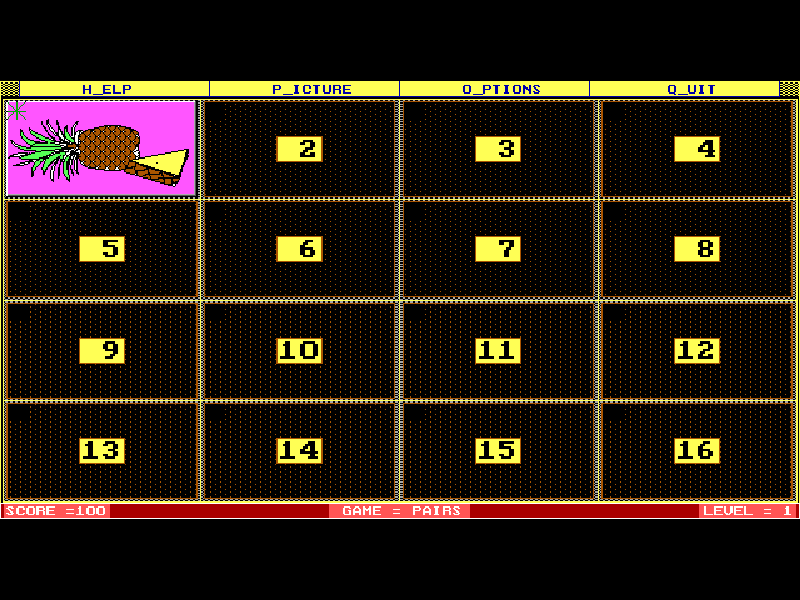
Crazy Shuffle turns a board of hidden pictures into a memory game. Choose cards to reveal them, remember where they are and try to find matching pairs. Its other modes ask for triplets or MatchIt combinations, including words paired with pictures in the beginner image sets.
The picture set, difficulty and display speed can be changed from the original menus. Start with the large fruit or jungle pictures before trying denser boards. Repeatedly uncovering the same card beyond the first two looks reduces the score, so remembering locations matters more than clicking quickly.
This page uses Alive Software’s 1.51 shareware release, a 1994 revision of the game first released in 1989. The documented K startup option enables keyboard control for this browser edition. All original files and shareware notices remain; the additional registered picture library is not included.
Start here
Quick tips
Press Enter through the opening notices. Press P for Pictures, then choose a set with the arrows and Enter.
Start with 1FRUIT or 1JUNGLE; these large-picture sets use level 1.
Move with the arrows and reveal a card with Enter or Space. Use Options to change the matching mode or reveal speed.
- Arrow keys
- Move the card cursor; use the same keys to navigate the menus.
- Enter
- Continue notices or reveal/select the highlighted card or menu item.
- Space
- Select a card or menu item.
- P
- Open the Pictures menu.
- O
- Open Options for game mode, level and speed.
- H
- Open the original help.
- Esc
- Leave a menu or open the quit option.
Keep playing
Similar Games
Ratings & comments
Help improve this entry
Something not working?
Report a gameplay or information problem. Short reports are enough.
Archive notes
Rights and Source Notes
Browser play is available for this entry.
- Distribution
- Shareware
- Browser player
- js-dos · Browser play
- Added to archive
- 2026-11-03
No comments yet. Be the first to share a tip.