Squarex
Saves are stored in this browser.
Player notes
About this game
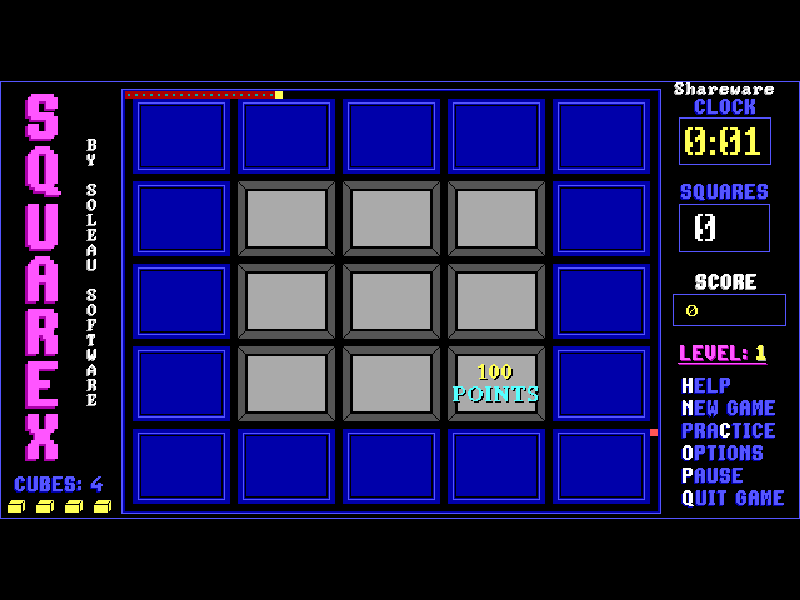
Squarex mixes route planning with arcade movement. Your yellow cube starts at the upper-left corner of the board. Press an arrow key to begin moving; it keeps travelling in that direction until a boundary stops it or you choose another route at an intersection. Going all the way around a gray square turns it green. Complete every gray square to clear the level; blue squares do not count.
Orange cubes enter from the lower-right corner and chase you along the paths. Pink cubes temporarily turn those pursuers light blue, allowing you to capture them for points. Each level also offers a special 100-point square, but its bonus disappears if you enclose a different square first. A red trail records the paths you have already travelled.
This is the seven-level DOS shareware edition, version 1.2. Each board has a two-minute limit, and a new game begins with four cubes. The C practice option lets you try an available level without recording a score. Native Save and Load are registered-edition features and are not included in this shareware release.
Start here
Quick tips
Tap a direction rather than holding it constantly; the cube keeps moving, and turns take effect at intersections.
Check where the 100-point square is before enclosing your first ordinary square.
Use P to pause or C to practise a level. Practice runs do not record scores.
- Arrow keys
- Start the level and steer the continuously moving yellow cube
- P
- Pause the game
- C
- Choose a practice level without recording scores
- N
- Start a new game
- H
- Read the original directions
- O
- Open options for sound and high scores
- Enter
- Continue through the opening instructions
- Q
- Quit the original game
Keep playing
Similar Games
Ratings & comments
Help improve this entry
Something not working?
Report a gameplay or information problem. Short reports are enough.
Archive notes
Rights and Source Notes
Browser play is available for this entry.
- Distribution
- Shareware
- Browser player
- js-dos · Browser play
- Added to archive
- 2026-11-02
No comments yet. Be the first to share a tip.