Sudoku
Saves are stored in this browser.
Player notes
About this game
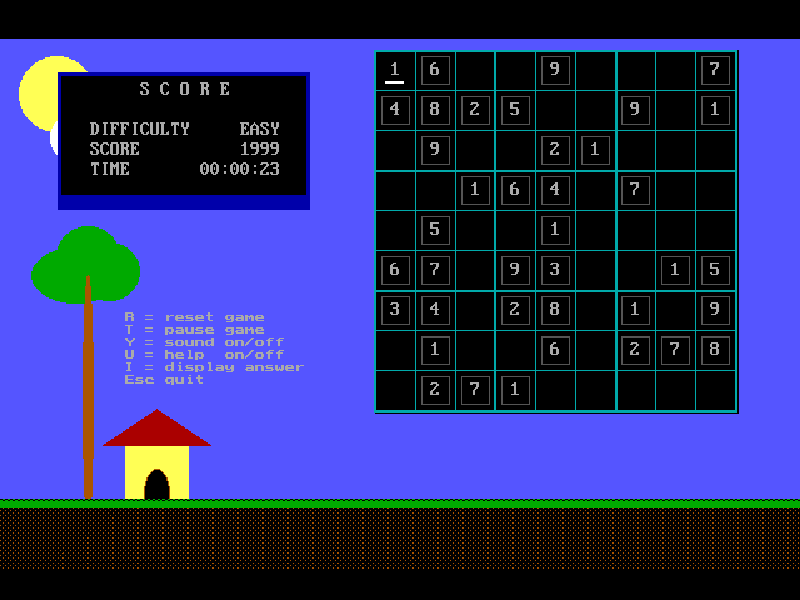
Sudoku asks you to fill each row, column and three-by-three box with the digits 1 through 9 without repeats. The grey-boxed numbers are fixed clues; the remaining cells can be edited. A keyboard cursor marks your current cell, so no mouse is required.
Use the arrow keys or WASD to move, type 1–9 to enter a number and press 0 to erase your own entry. The game keeps a timer and a decreasing score, with separate controls for pausing, restarting and displaying help. Its native help explains the scoring and the built-in answer option.
This is Abhijeet Meshram’s 2005 freeware release for DOS. Press H at the title to read the instructions before selecting a difficulty. The original version 1.0 is preserved; the website’s Chinese explanation does not change the game’s English interface.
Start here
Quick tips
Press H at the title for instructions, then start with Easy to learn the keyboard layout.
Grey-boxed clues cannot be changed. Use 0 only to clear a number you entered yourself.
Check both the row and column, then the three-by-three box. T pauses when you need to step away.
- Arrow keys / WASD
- Move the cursor between cells.
- 1–9
- Enter a digit in an editable cell.
- 0
- Erase a digit you entered.
- Enter
- Continue and confirm opening choices.
- H
- Read the instructions from the title screen.
- U
- Toggle the in-game help.
- T
- Pause or resume.
- R
- Reset the game.
- Esc
- Quit the game.
Keep playing
Similar Games
Ratings & comments
Help improve this entry
Something not working?
Report a gameplay or information problem. Short reports are enough.
Archive notes
Rights and Source Notes
Browser play is available for this entry.
- Distribution
- Freeware
- Browser player
- js-dos · Browser play
- Added to archive
- 2026-11-04
No comments yet. Be the first to share a tip.