Super Worms
Saves are stored in this browser.
Player notes
About this game
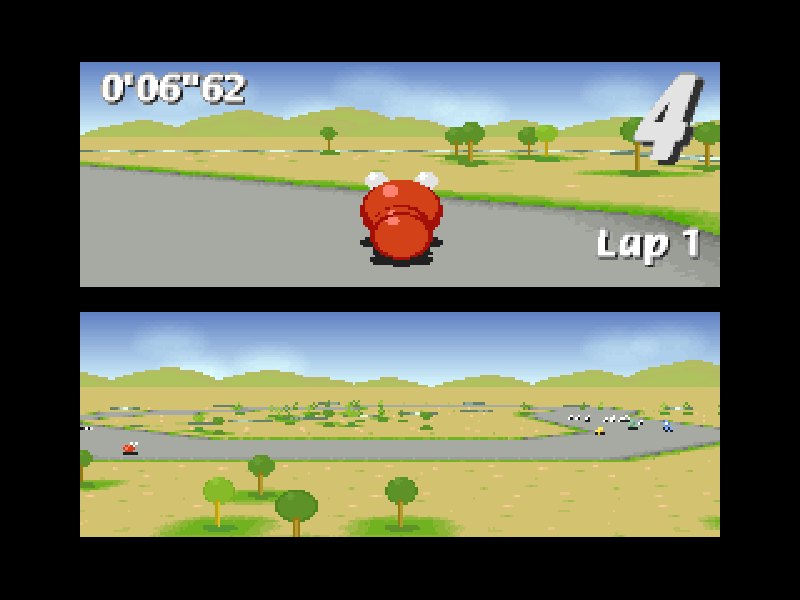
Super Worms is a DOS racing game by Mike Wiering/Wiering Software. Instead of cars, colourful worms compete around compact tracks. You steer from behind the racer while a second view helps show the course. White balloons provide items that can change the race, from speed aids to obstacles for other players.
In the single-player Grand Prix, you race computer opponents across five tracks, with five laps on each. Finishing last means trying that track again. Practice mode lets you learn a course without working through the whole Grand Prix. The original two-player Match and Battle modes share one computer; they are not online multiplayer.
For player one, the arrow keys steer, accelerate and brake, and Insert uses an item. Player two uses S and F to steer, E to accelerate, C to brake and Space for items. The original manual notes that selecting a joystick for player one swaps these keyboard sets, so this browser setup keeps keyboard control as the starting point.
This is version 1.62 of the unregistered DOS shareware, preserving the original files and license. It includes five tracks and one battle arena. Extra tracks, arenas and Knock-Out mode belong to the registered release. The original README also documents P for pause, F3 to change the single-player camera and Shift+Esc to restart a Grand Prix track.
Start here
Quick tips
Choose single-player, Grand Prix and the first GP, then confirm the racer selection with Enter. Wait for the starting lights.
Player one's item key is Insert, not Space; Space belongs to player two.
Brake before tight turns rather than steering at full speed throughout.
P pauses the race. F3 changes the single-player camera; Shift+Esc restarts a Grand Prix track.
- Left / Right
- Player 1: steer left or right
- Up
- Player 1: accelerate
- Down
- Player 1: brake
- Insert
- Player 1: use the collected item
- Enter
- Confirm menu, GP and racer selection
- P
- Pause or resume the race
- F3
- Change the single-player camera
- Shift + Esc
- Restart the current Grand Prix track
- Esc
- Return or quit the current race
- F4
- Toggle game sound
Keep playing
Similar Games
Ratings & comments
Help improve this entry
Something not working?
Report a gameplay or information problem. Short reports are enough.
Archive notes
Rights and Source Notes
Browser play is available for this entry.
- Distribution
- Shareware
- Browser player
- js-dos · Browser play
- Added to archive
- 2026-10-31
No comments yet. Be the first to share a tip.