Three
Saves are stored in this browser.
Player notes
About this game
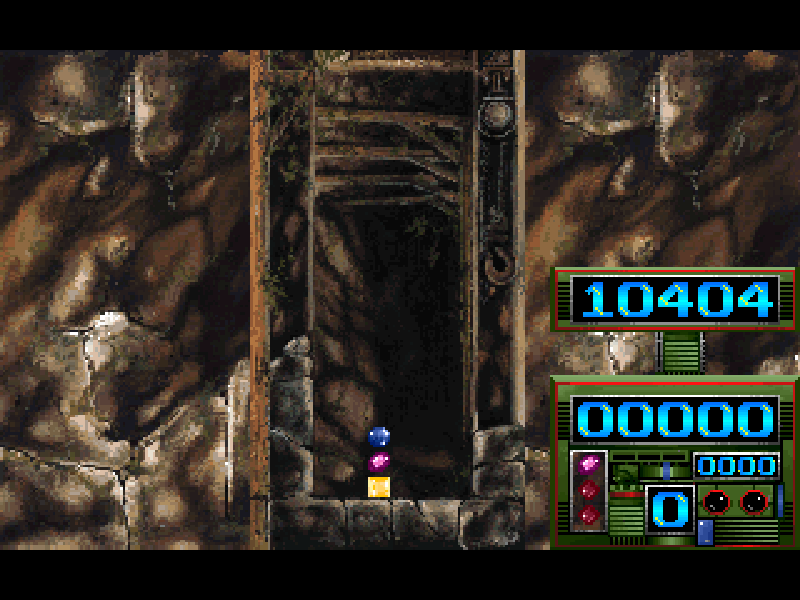
Three is a falling-block puzzle from T&Q Co. Each piece is a vertical column of three symbols. Move the column sideways and cycle its order to line up matching symbols horizontally, vertically or diagonally. Clearing groups opens space; leaving awkward gaps makes the next column harder to place.
The options screen offers four visual themes and three difficulty choices. During play, speed increases through ten levels as you clear blocks. Select New Game to begin. In two-player mode the second player occupies the left-hand field and uses a separate section of the keyboard, so two people can play on one computer.
This original 1997 freeware distribution includes its Italian manual and credits. Quercia Claudio Gabriele programmed the game with Finotti Luca; Trivero Stefano created the graphics, and Bozzo Luca made the music and effects. Select an audio mode at startup; N starts without game sound. The website mute control is independent.
Start here
Quick tips
At startup choose an audio option, then press Enter at the title. In the options menu choose New Game.
Wait for the ready message to disappear. Left/Right move a column, Up/Down cycle its symbols, and Enter drops it.
Build for diagonal matches as well as rows. A fast drop is useful only after checking the symbol order.
- Arrow keys
- Navigate menus; Left/Right move the first player’s column and Up/Down cycle its order.
- Enter
- Place the block at the bottom; also confirm menus.
- A / D
- Player 2: move the column left or right.
- W / S / X
- Player 2: cycle symbols upward with W, downward with S or X.
- Space
- Player 2: drop the column; also confirm menus.
- Esc
- End the round and return toward the main menu.
- S / M / P / N
- At startup choose stereo, mono, PC speaker or no sound.
Keep playing
Similar Games
Ratings & comments
Help improve this entry
Something not working?
Report a gameplay or information problem. Short reports are enough.
Archive notes
Rights and Source Notes
Browser play is available for this entry.
- Distribution
- Freeware
- Browser player
- js-dos · Browser play
- Added to archive
- 2026-11-04
No comments yet. Be the first to share a tip.