VGATetris
Saves are stored in this browser.
Player notes
About this game
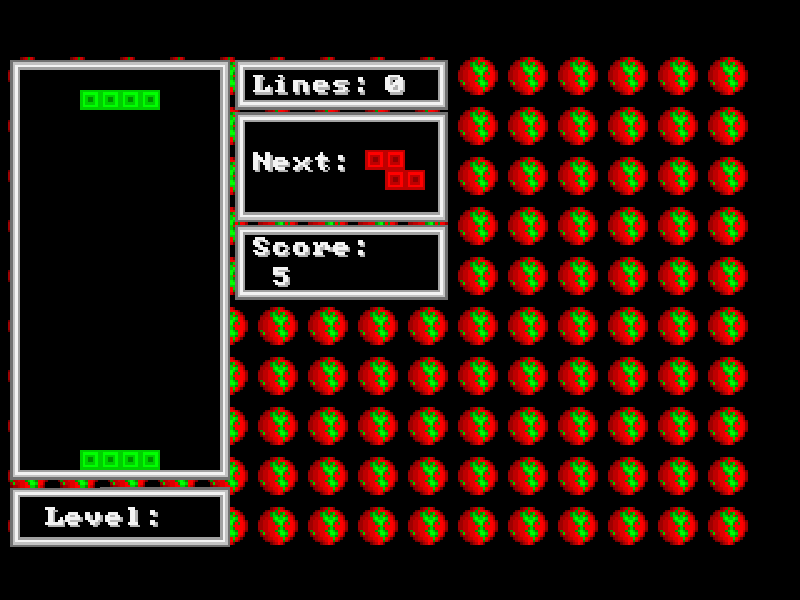
VGATetris is Jared Tarbell’s colourful DOS interpretation of the falling-block puzzle. Arrange the descending pieces into complete horizontal rows, leave room for the next shape and avoid piling blocks to the top. A separate panel shows lines, score and level; the next-piece preview can be switched on or off.
The original controls use the numeric keypad with Num Lock enabled. Keypad 4 and 6 move the piece, 5 rotates it and 2 brings it down. Space drops it straight to the bottom. Press N to display the upcoming piece, which is useful when deciding whether to fill a gap now or save it for another shape.
This is freeware version 1.1, dated April 4, 1991, with the original README and background files preserved. It is an independent DOS release, not an official modern Tetris edition. The game and its brief prompts remain in English. On a keyboard without a number pad, use the site’s extra-key controls or configure the touch buttons to the documented keypad actions.
Start here
Quick tips
Continue past the title to start. Enable Num Lock before using the original keypad controls.
Use keypad 4/6 to move and 5 to rotate. Space drops the current piece immediately, so check its landing position first.
N toggles the next-piece display. Esc ends the game; answer the game-over prompt with Y or N.
- Numpad 4 / Numpad 6
- Move the falling piece left or right with Num Lock on.
- Numpad 5
- Rotate the falling piece with Num Lock on.
- Numpad 2
- Move the piece down with Num Lock on.
- Space
- Drop the current piece to the bottom.
- N
- Toggle the next-piece preview.
- Num Lock
- Enable the original numeric keypad controls.
- Enter
- Continue past the title.
- Esc
- End the current game.
- Y / N
- Answer the game-over prompt.
Keep playing
Similar Games
Ratings & comments
Help improve this entry
Something not working?
Report a gameplay or information problem. Short reports are enough.
Archive notes
Rights and Source Notes
Browser play is available for this entry.
- Distribution
- Freeware
- Browser player
- js-dos · Browser play
- Added to archive
- 2026-11-04
No comments yet. Be the first to share a tip.