Word Whiz
Saves are stored in this browser.
Player notes
About this game
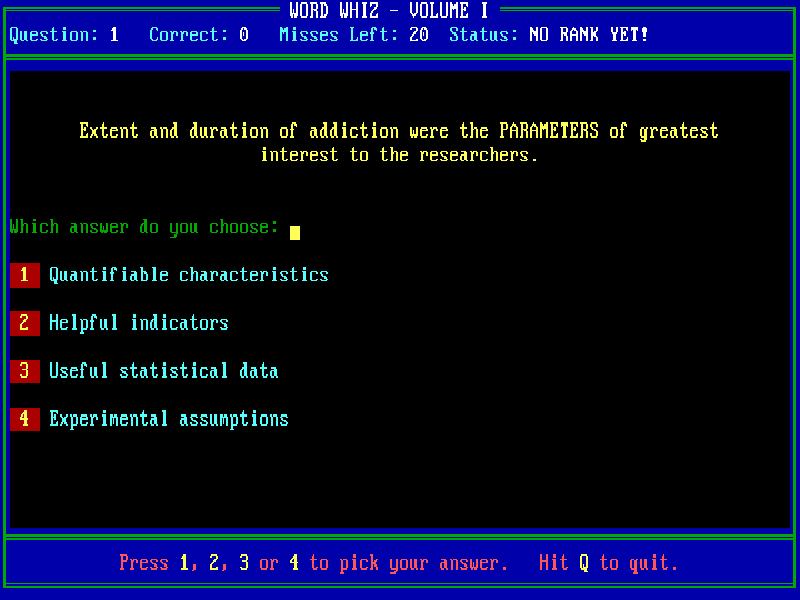
Word Whiz is an English vocabulary quiz by Scott Miller. Each question places a highlighted word in context and offers four possible meanings. A status line tracks your correct answers, remaining misses and current rating, while some correct answers reveal a further explanation or related words.
Choose a volume with 1–4 in the browser launch menu. In the original program, C selects colour and Y or N enables or disables sound. Continue through the title and instructions, then choose whether wrong answers should reveal the correct choice: 1 shows it and 2 keeps it hidden. During the quiz, press 1–4 to answer and Q to quit.
The original Volume I instructions describe 100 questions, a starting allowance of 20 misses and a bonus miss for each ten correct answers. Read the full sentence rather than judging a word in isolation. The reveal-answer mode is a useful starting point when you want to learn from mistakes instead of taking a blind test.
This page includes all four volumes from Apogee's March 2009 freeware re-release. Volume I identifies itself as version 3.0; the series originally appeared in 1988. The release includes historical source material and later publisher notes, which are preserved with the game. Old registration addresses are obsolete. Questions, answers and feedback remain in English; the Chinese page explains how to play without translating the quiz itself.
Start here
Quick tips
Choose answer mode 1 if you want the game to reveal the correct meaning after a mistake.
Read the example sentence before selecting a definition: several choices may sound plausible in isolation.
After a correct answer, look for the extra explanation before pressing a key to continue.
Use the opening 1–4 menu to try another volume. These are separate original executables in the same freeware package.
- 1 / 2 / 3 / 4
- Choose a volume or answer; 1–2 also choose answer-reveal mode
- C / M
- Choose colour or monochrome at startup
- Y / N
- Enable or disable game sound at startup
- Enter
- Continue title, instructions and answer feedback
- Q
- Quit the current quiz
Keep playing
Similar Games
Ratings & comments
Help improve this entry
Something not working?
Report a gameplay or information problem. Short reports are enough.
Archive notes
Rights and Source Notes
Browser play is available for this entry.
- Distribution
- Freeware
- Browser player
- js-dos · Browser play
- Added to archive
- 2026-10-27
No comments yet. Be the first to share a tip.