World Empire
Saves are stored in this browser.
Player notes
About this game
World Empire combines territorial conquest with the politics of its fictional generals. Recruit armies, attack neighbouring countries and keep enough troops behind to hold what you have taken. A country’s ideology matters: a sympathetic population is easier to occupy, while hostile territory can revolt if you leave it poorly defended.
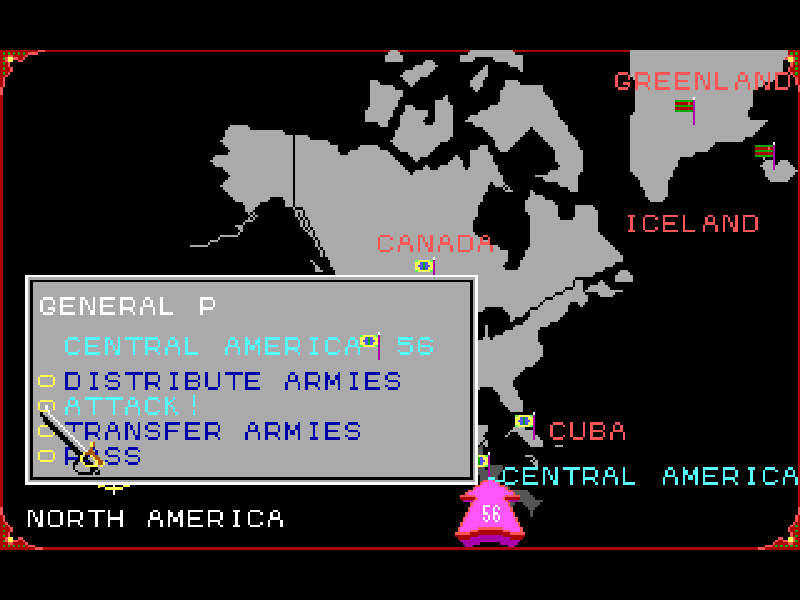
Use the global map to choose a continent, then work on its detailed map. From a country you control, the action menu offers army distribution, attacks and transfers. Combat reduces the opposing forces through repeated exchanges. The original manual explains occupation requirements and the extra armies awarded for controlling territory and continents.
This is the Ultimate Software distribution of DOS version 2.00, dated 1992, from the World Empire series first released in 1991. The shareware supports one to four human players; selecting one starts a game against the computer. At startup, choose W to play without sound or S with sound. Begin at Novice, enter a name and follow the introductory screens. The game and maps remain in English.
Start here
Quick tips
Select one player to face the computer. Allow the original opening map and travel animation to finish before continuing.
On the global map, Enter opens a continent. On its detailed map, Enter opens the selected country’s action menu.
Use Alt+H for help. F1 ends your turn on the global map but lists neighbours on a continent map, so check which screen is active.
- Arrow keys
- Move the map cursor or select a menu option.
- Enter
- Confirm setup choices, open maps and country actions, or continue an attack when prompted.
- Space
- Adjust army quantities using the selected control in distribution, transfer or occupation menus.
- Esc
- Return from a continent to the global map; open the game options on the global map.
- F1
- Global map: end the turn. Continent map: show bordering countries. Attack prompt: auto-attack.
- Alt+H
- Open context help at supported menus.
- W
- At startup, begin without sound.
- S
- At startup, begin with sound.
- Left mouse button
- Select map locations and menu choices.
- Right mouse button
- Return or cancel in the map interface.
Keep playing
Similar Games
Ratings & comments
Help improve this entry
Something not working?
Report a gameplay or information problem. Short reports are enough.
Archive notes
Rights and Source Notes
Browser play is available for this entry.
- Distribution
- Shareware
- Browser player
- js-dos · Browser play
- Added to archive
- 2026-11-04
No comments yet. Be the first to share a tip.