Arctic Adventure
Saves are stored in this browser.
Player notes
About this game
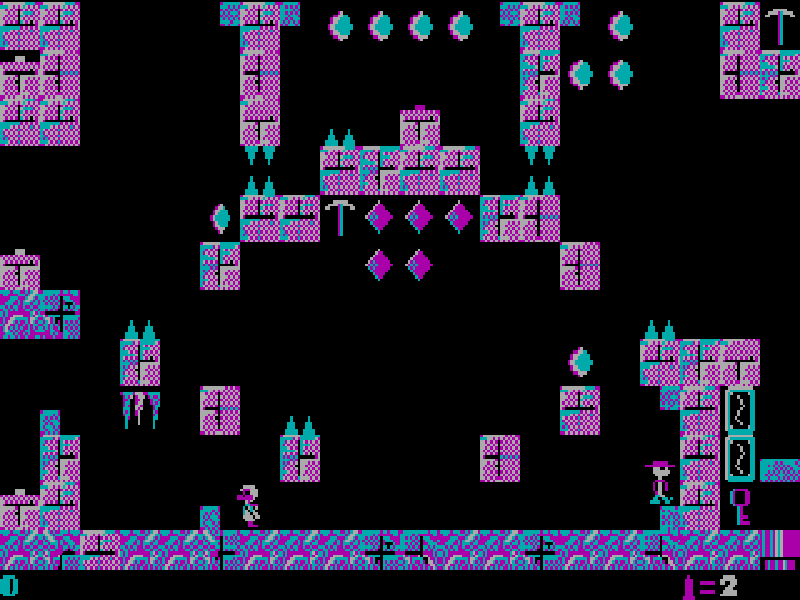
Arctic Adventure sends Nevada Smith into an icy landscape in search of Viking treasure. An overworld map connects the caves, so the adventure involves finding a route as well as tackling the platform rooms. Keys, boats and other discoveries can open paths that were previously blocked.
Inside a cave, collect the pickaxes needed to break through its final ice walls. The original instructions explain that touching objects collects or activates them. You have unlimited lives, but ammunition is limited, so jumping past an enemy may be more useful than spending a shot.
Choose volume 1–4 in the opening launcher, then press J for Journey Onward. Use the arrow keys to move around the map and enter a cave through its entrance. Within a cave, Left and Right move, Space jumps, F shoots and Down can enter certain pipes. P pauses; S and R save and restore from the map screen only.
This is DOS version 2.0, with all four volumes from Apogee's March 2009 freeware release. George Broussard's Micro F/X Software developed the game, published by Apogee in 1991. All original episode files and the later release notes are retained. Menus and game text remain in English.
Start here
Quick tips
The map is part of the game: follow open corridors to the mouth of a cave instead of trying to walk through the surrounding ice.
Collect the pickaxes in each cave before heading for the ice barrier at the exit.
Stand on a pipe and press Down to check whether it leads to a hidden room.
Save and restore with S and R on the overworld map. Those commands are not available inside a cave.
- Left / Right
- Move left or right; navigate the map
- Up
- Move up on the map
- Down
- Move down on the map; enter some pipes
- Space
- Jump
- F
- Fire the gun
- J
- Start Journey Onward from the main menu
- I
- Read instructions from the main menu
- P
- Pause or resume
- S
- Save on the map screen
- R
- Restore on the map screen
- Esc
- Open the quit prompt
- Y / N
- Confirm or cancel quitting
- 1 / 2 / 3 / 4
- Choose a volume in the opening launcher
Keep playing
Similar Games
Ratings & comments
Help improve this entry
Something not working?
Report a gameplay or information problem. Short reports are enough.
Archive notes
Rights and Source Notes
Browser play is available for this entry.
- Distribution
- Freeware
- Browser player
- js-dos · Browser play
- Added to archive
- 2026-10-26
No comments yet. Be the first to share a tip.