Pharaoh's Tomb
Saves are stored in this browser.
Player notes
About this game
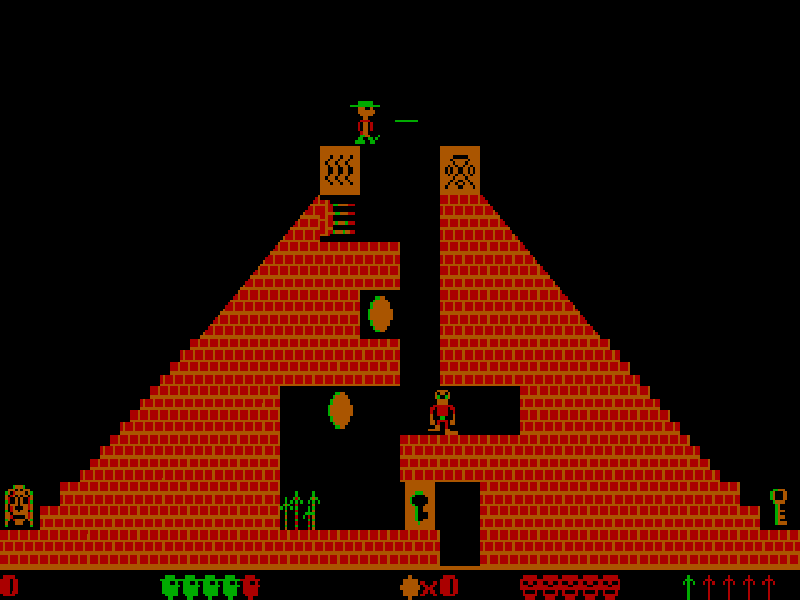
Pharaoh's Tomb is a room-based DOS platform game starring explorer Nevada Smith. Each screen presents a new arrangement of ledges, monsters, treasure and hazards. Finding a route through the pyramid requires careful jumps and attention to the keys and objects collected along the way.
The original default movement scheme is unusual: Ctrl moves left and Alt moves right. Space jumps, and F throws a spear. Arrow keys should not be assumed to work with this default configuration. The main menu's Config Keyboard option offers alternative movement schemes if you prefer to change the game's own settings.
Press E at the main menu to Enter Pyramid, or I for Instructions. During play, P pauses, S saves and R restores. Spears are your defence against monsters, but you need enough space to throw one before an enemy reaches you. The original help also warns that collisions use rectangular areas around moving objects, so give hazards a wider margin than their artwork suggests.
This page includes all four volumes from the DOS 3.0 freeware package released by Apogee in March 2009. George Broussard created the game at Micro F/X Software; Apogee's release notes date its publication to 1990. The original files and credits remain intact. Choose a volume with 1–4 at startup; the game itself remains in English.
Start here
Quick tips
The default movement keys are Ctrl and Alt. Use the on-screen direction pad or these keys, rather than assuming arrows will move Nevada.
Leave room between yourself and a monster before throwing a spear.
Jump into suspicious bricks to look for hidden bonuses, but avoid brushing against nearby hazards.
The original help says 100 coins award an extra life, while five idols award 50,000 points.
- Ctrl
- Move left
- Alt
- Move right
- Space
- Jump
- F
- Throw a spear
- E
- Start a game from the main menu (Enter Pyramid)
- I
- Read instructions from the main menu
- P
- Pause or resume
- S
- Save the game
- R
- Restore a saved game
- Esc
- Quit the current game
- 1 / 2 / 3 / 4
- Choose a volume in the opening launcher
- Enter
- Continue title and instruction screens
Keep playing
Similar Games
Ratings & comments
Help improve this entry
Something not working?
Report a gameplay or information problem. Short reports are enough.
Archive notes
Rights and Source Notes
Browser play is available for this entry.
- Distribution
- Freeware
- Browser player
- js-dos · Browser play
- Added to archive
- 2026-10-26
No comments yet. Be the first to share a tip.