EGA Trek
Saves are stored in this browser.
Player notes
About this game
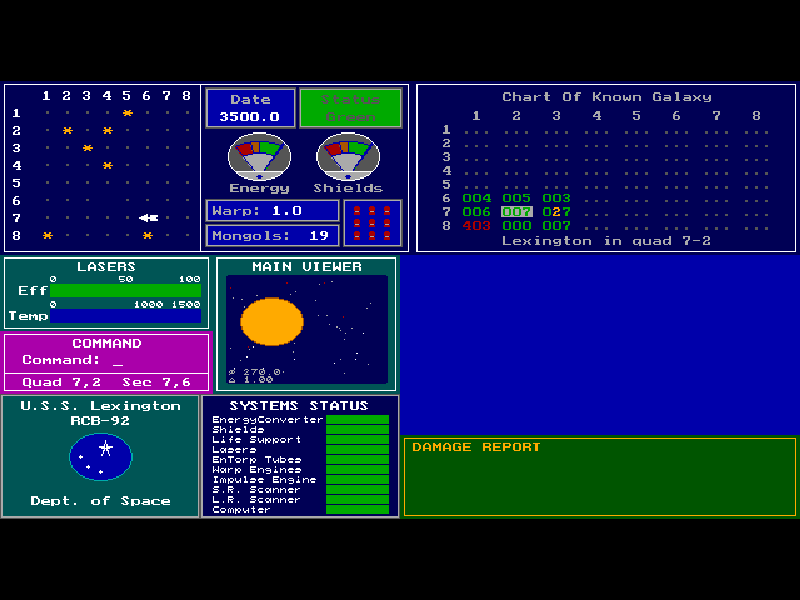
EGA Trek turns a space mission into a command console. As captain of the U.S.S. Lexington, you navigate a grid of quadrants and sectors while tracking energy, shields, repairs and enemy ships. The sensors and chart do much of the storytelling: a quiet sector can become dangerous when you move into range of a hostile fleet or discover that an important system is damaged.
After the title screen, answer the briefing and restore questions, enter a captain name, choose a command level from 1 to 5 and set the mission’s self-destruct password. Confirm typed answers with Enter. Level 1 is the gentlest introduction. The password belongs to this fictional mission; it is not a website account password, so do not reuse a real one.
F1 lists the commands. Type M and press Enter to navigate, then enter a destination. Two coordinates specify a sector in your current quadrant; four specify both quadrant and sector, with the vertical coordinate first. For example, 7,6 means sector row 7, column 6. Up raises shields and Down lowers them. Other commands include W for warp speed, L for lasers, T for torpedoes, E for energy and D for docking beside a base.
This page uses revision 3.1, The Mongol Invasion, from Nels Anderson and Arcanum Computing. SAVE writes a native game file; Enter accepts the default filename egatrek.sav. Restore it through the startup question on a later launch. Native file saves and the website’s backup controls are distinct. The complete original shareware archive and documentation remain intact, including historical registration terms.
Start here
Quick tips
Confirm each startup answer with Enter. Choose command level 1 while learning the console.
Use F1 whenever you need the command list; navigation is typed, not controlled by a character movement pad.
For a move within the current quadrant, enter the destination row first and column second. Dock next to a base to replenish supplies.
The mission password is fictional game data. Use a made-up value, never a real account password.
- Enter
- Confirm typed answers, commands and coordinates
- F1
- Show the original command list and help
- M
- Type M then Enter to begin navigation
- 0 / 1 / 2 / 3 / 4 / 5 / 6 / 7 / 8 / 9
- Enter command levels and destination coordinates
- Up
- Raise shields at the command prompt
- Down
- Lower shields at the command prompt
- W
- Type W then Enter to set warp speed
- L
- Type L then Enter for lasers
- T
- Type T then Enter for torpedoes
- E
- Type E then Enter to manage energy
- D
- Type D then Enter to dock beside a base
Keep playing
Similar Games
Ratings & comments
Help improve this entry
Something not working?
Report a gameplay or information problem. Short reports are enough.
Archive notes
Rights and Source Notes
Browser play is available for this entry.
- Distribution
- Shareware
- Browser player
- js-dos · Browser play
- Added to archive
- 2026-11-02
No comments yet. Be the first to share a tip.