Heartlight PC
Saves are stored in this browser.
Player notes
About this game
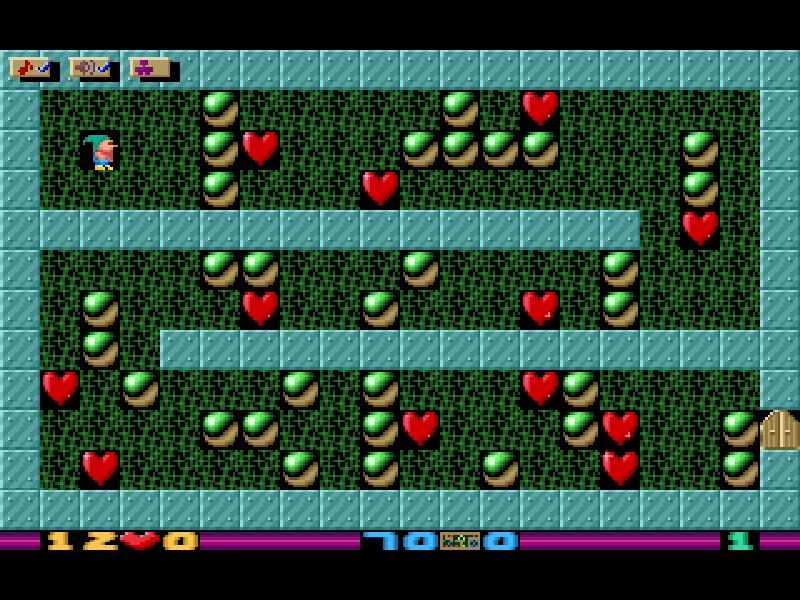
Heartlight PC is a DOS puzzle game by Xland in which a small dwarf searches each room for hearts. Collect the required number to open the exit, then find a safe way through. Objects can block narrow passages, and some can be pushed when the space beyond them is clear. A careless move can leave the route unusable, but you have unlimited lives.
Press Space at the title screen to start and use the arrow keys to move. The two counters show the hearts needed and the number collected. If a plan goes wrong, Esc restarts the room. Space with Left or Right switches levels, so you can leave a difficult puzzle and try another without completing the set in a fixed order.
The title screen offers three named progress slots through Enter. These are separate player records, not simultaneous multiplayer. F10 returns to that screen; F6 and F7 toggle the original music and sound effects. The game itself retains its original presentation and language.
This is the 2006 release recompiled by Maciej Miasik from the original source with the copyright holders' permission. It contains the full set of 70 levels and is distributed under Creative Commons Attribution-ShareAlike 2.5. Janusz Pelc created the programming, graphics and music. The original README, credits and files are preserved.
Start here
Quick tips
Start with Space; use Enter at the title screen only when choosing or naming a progress slot.
Watch the required-heart counter before heading to the exit.
Restart a trapped room with Esc, or hold Space and tap Left/Right to try another level.
A push needs a clear space behind the object. Plan the route before moving objects into narrow gaps.
- Arrow keys
- Move the dwarf; push movable objects when the space beyond is clear
- Space
- Start from the title screen
- Space + Left / Right
- Choose the previous or next level during play
- Enter
- Choose or name a player progress slot at the title screen
- Esc
- Restart the current level
- F10
- Return to the title screen
- F6
- Toggle music
- F7
- Toggle sound effects
- Alt + X
- Quit to DOS without confirmation
Keep playing
Similar Games
Ratings & comments
Help improve this entry
Something not working?
Report a gameplay or information problem. Short reports are enough.
Archive notes
Rights and Source Notes
Browser play is available for this entry.
- Distribution
- CC BY-SA 2.5
- Browser player
- js-dos · Browser play
- Added to archive
- 2026-11-01
No comments yet. Be the first to share a tip.