Hoosier City
Saves are stored in this browser.
Player notes
About this game
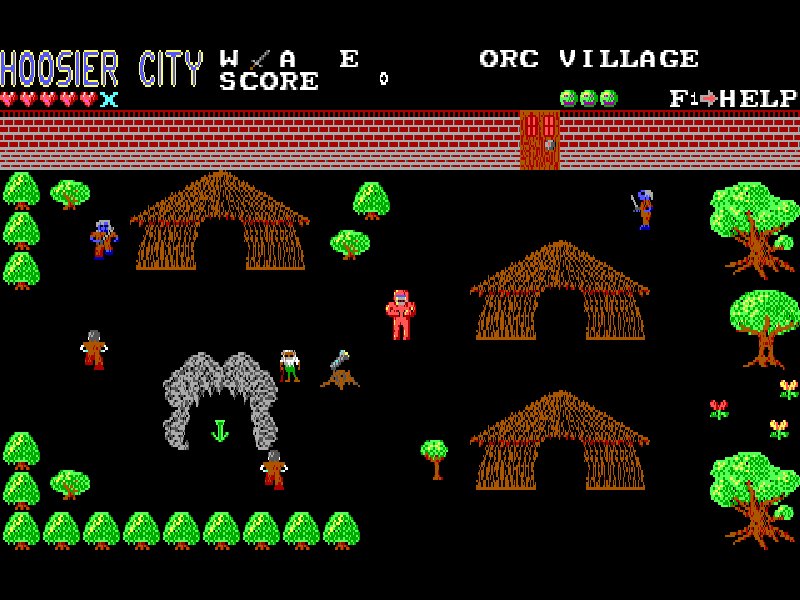
Hoosier City is a top-down DOS adventure from Wetware, published by MVP Software. After a nuclear war, scattered survivors live under protective domes. A distress call draws the ruler of Oil City to Hoosier City, where a helicopter arrival turns into a fight through settlements occupied by hostile creatures. The opening area, Orc Village, places a sword in your inventory and leaves room to explore rather than sending you along a single corridor.
Move with the arrow keys and use Space to attack with the selected weapon. Enter opens the weapon selector; Tab selects equipment. These menus use the arrow keys and Enter, so choosing what to carry is part of the adventure. F2 displays your status and possessions. Watch the hearts and the space around nearby enemies before stepping into another encounter.
The original help key is F1. F4 saves progress and F3 loads it, but the manual explains that a save returns you to the last continue point you occupied, not necessarily the exact spot where you pressed the key. This native save file is separate from the website player’s file backup. S switches sound, Q ends the current game and Esc exits the original program.
This page uses the original shareware first volume, Assault of the Orcs. The other two volumes are not included as playable chapters. The complete source archive, original documentation and publisher notices remain intact. Startup uses the original HC.COM launcher: press Enter through the introductory screens, then choose Start Game. The original order forms describe a historical release, not a current purchase service.
Start here
Quick tips
Press Enter through the introduction, then confirm Start Game in the main menu.
Choose a weapon with Enter before relying on Space; Tab handles equipment separately.
Native saves resume at a continue point, so do not assume every room position has been saved.
- Arrow keys
- Move; choose items in menus
- Space
- Attack with the selected weapon
- Enter
- Continue, start the game or select a weapon
- Tab
- Select equipment
- F1
- Open the original help
- F2
- Show status and possessions
- F3
- Load a native saved game
- F4
- Save progress at the last continue point
- S
- Toggle sound
- Q
- End the current game
- Esc
- Exit the original program
Keep playing
Similar Games
Ratings & comments
Help improve this entry
Something not working?
Report a gameplay or information problem. Short reports are enough.
Archive notes
Rights and Source Notes
Browser play is available for this entry.
- Distribution
- Shareware
- Browser player
- js-dos · Browser play
- Added to archive
- 2026-11-01
No comments yet. Be the first to share a tip.