Jill of the Jungle
Saves are stored in this browser.
Player notes
About this game
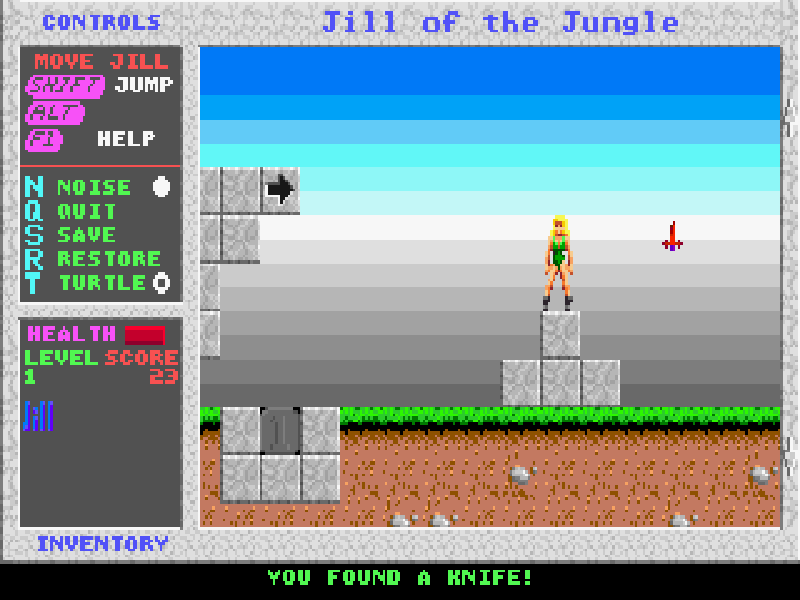
Jill of the Jungle is Epic MegaGames’ 1992 platform adventure. Its interconnected map leads into individual stages with creatures, keys, gems and hidden routes. The opening area already requires a little exploration: collect a gem to open the gate, then continue through the boulders into the first level.
Unlike many Apogee platform games, Jill uses Shift to jump. Arrow keys move her, and Alt uses an acquired weapon. Early in the first level you can collect a knife; after throwing it, your movement affects its returning path. Keys open doors, while gems are used for the marked gates.
Press Enter to accept the original startup configuration, then choose Play. F1 opens a scrollable help window. S opens the game’s save slots and R restores a saved game; T toggles its slower Turtle mode. Keep an eye on health while exploring, since touching creatures can cost health and an empty bar returns you to the level’s start.
This is the original DOS version 1.2 shareware Volume I, owned by Epic MegaGames. Shareware is a try-before-you-buy release, not public-domain software. The two later volumes are not bundled here.
Start here
Quick tips
Use Shift for jumping; Ctrl is not the jump key in this game.
Collect the gem on the opening map to unlock the gate before heading through the boulders.
After finding the knife, use Alt to throw it and experiment with movement while it returns.
- Arrow keys
- Move Jill and select menu options
- Shift
- Jump
- Alt
- Use the acquired weapon, including the knife
- Enter
- Accept startup settings or confirm a menu choice
- F1
- Open help; use arrows to scroll
- S
- Open save slots
- R
- Restore a saved game
- T
- Toggle slower Turtle mode
- Esc
- Close help or cancel a menu
Keep playing
Similar Games
Help improve this entry
Something not working?
Report a gameplay or information problem. Short reports are enough.
Archive notes
Rights and Source Notes
Browser play is available for this entry.
- Distribution
- Shareware
- Browser player
- js-dos · Browser play
- Added to archive
- 2026-10-16